

AppScreen
Make App Store and Google Play screenshots in your browser, on one wide canvas
AppScreen is a freemium AI tool. Make App Store and Google Play screenshots in your browser, on one wide canvas. Editors list 4 strengths and 3 limits on this page, next to the published price.
Quick facts
- Best for
- Make App Store and Google Play screenshots in your browser, on one wide canvas
- Pricing
- Freemium
- Editor rating
- 0 / 5
- Community saves
- 0
About AppScreen
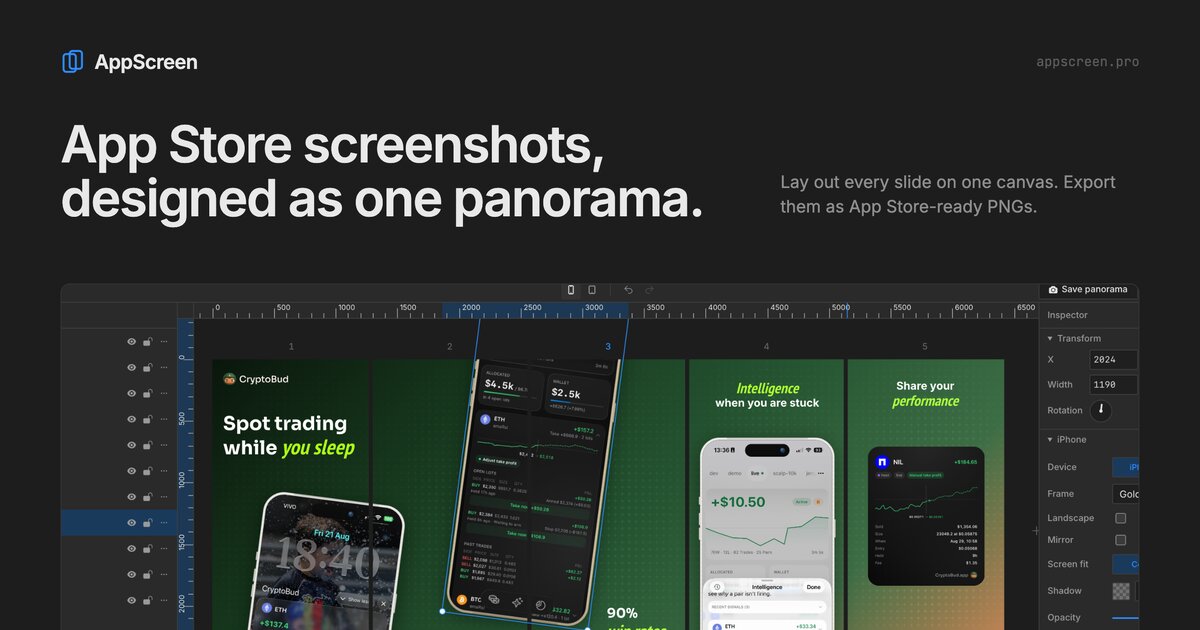
AppScreen is a browser editor for store screenshots, for both the App Store and Google Play. Every slide sits on one continuous canvas, so a device frame or a headline can cross the edge between two screenshots and the whole set reads as one scene when people swipe through it. On export, AppScreen slices the canvas into one PNG per slide at store size: 1284x2778 for iPhone, 2064x2752 for iPad, 1080x1920 for Android phones and 1440x2560 for Android tablets. The editor has iPhone, iPad, Android phone and tablet frames, gradient and solid backgrounds, rich text with any Google Font, logos, images and starter presets. You can begin without an account; work is saved in the browser. The free plan covers iPhone and Android phone frames, 3 projects and 5 slides. Pro is a single $9 payment with no subscription and adds tablet frames, up to 10 slides (8 on Google Play), patterns, cloud projects, share links, version history and a remote MCP server, so agents like Claude Code, Cursor or Codex can build a screenshot set in your open tab.
Pros
- Panorama layout lets frames and text span two slides
- Exports at App Store and Google Play sizes
- No account needed to start
- One-time $9 Pro, no subscription
Cons
- Tablet frames need Pro
- Free plan limited to 3 projects and 5 slides
- Desktop browser only