

Documentation
lark-wiki
Manage Lark Wiki spaces, members, nodes, and document organization hierarchies.
17.5K 457.5K
View 
shieldcn-badges
Add beautiful shadcn/ui-styled README badges to projects using shieldcn. Use when adding badges, shields, or status indicators to README files, docs, or markdown. Triggers include "add badges", "add shields", "readme badges", "npm badge", "GitHub stars badge", "CI badge", "shieldcn", or any request to add project status badges to documentation.
Full skill instructions
Use shieldcn to add beautiful shadcn/ui-styled badges, badge groups, charts, headers, sponsors grids, and contributor images to READMEs and docs.
Base URL: https://shieldcn.dev
Install from the shieldcn repository with the Skills CLI:
npx skills add jal-co/shieldcn
Useful variants:
# Install globally instead of only the current project
npx skills add jal-co/shieldcn --global
# Install for a specific agent supported by the Skills CLI
npx skills add jal-co/shieldcn --agent AGENT_NAME
# Use once without installing
npx skills use jal-co/shieldcn@shieldcn-badges
Verify installation:
npx skills list
Copy one of these prompts after installing the skill. Replace bracketed values with the real project details.
Add a polished shieldcn badge row to my README for [owner/repo]. Include npm
version/downloads if this package is published as [package], GitHub stars,
license, CI status, and last commit. Center the row, make badges clickable, and
use a subtle shadcn style that works on GitHub light and dark themes.
Replace the existing Shields.io badges in this README with shieldcn equivalents.
Keep the same links where possible, remove stale or duplicate badges, and keep
the final row to 3-6 high-signal badges.
Migrate the existing Shields.io badges in this README to shieldcn, but undo any
split-style/two-tone badges. Use single-surface shieldcn badges instead: remove
split=true, labelColor, and other split-label styling unless a split badge is
explicitly needed for readability.
Create a compact shieldcn badge group for [owner/repo] with stars, license,
contributors, and last commit. Use one grouped image when that is cleaner than
separate badges.
Add release-quality README badges for a TypeScript library named [package]. I
want npm version, monthly downloads, license, types, GitHub stars, CI, and a
small branded static badge if it improves the visual hierarchy.
Design the top of my README using shieldcn: add an adaptive header banner for
[project name], a one-sentence tagline, and a centered badge row. Use GitHub
<picture> markup so the header and badges adapt to light/dark mode.
Add a left-aligned shieldcn header to my README with title [title], subtitle
[subtitle], logo [simple-icons slug], and a graph/grid style that fits a
technical open-source project.
Add a shieldcn npm download chart for [package] to the README. Use a concise
caption and choose chart dimensions that work well on GitHub mobile.
Add a shieldcn lifetime commit chart for [github username]. If multiple users
are listed, compare them in one chart and explain what the chart shows.
Improve this README's above-the-fold impression with shieldcn. Keep the content
accurate, add a header, badges, and one chart only where they help, and avoid
visual clutter.
I want to generate a whole README visually. Point me to shieldcn README Studio
and explain which blocks I should use for this project.
When this skill is loaded for a README/docs task:
owner, repo, package names, workflow names, and links.<a> wrappers when they represent an external page.<p align="center"> for centered rows in GitHub READMEs.<picture> markup when a header/chart/badge needs explicit light
and dark URLs.https://shieldcn.dev/studio.https://shieldcn.dev/{provider}/{...params}.svg SVG badge/image
https://shieldcn.dev/{provider}/{...params}.png PNG badge/image
https://shieldcn.dev/{provider}/{...params}.json raw resolved data
https://shieldcn.dev/{provider}/{...params}/shields.json Shields.io-compatible JSON
Markdown patterns:
[](https://link)

Adaptive GitHub pattern:
<p align="center">
<picture>
<source media="(prefers-color-scheme: dark)" srcset="https://shieldcn.dev/header/graph.svg?title=Acme&subtitle=Build+faster&logo=react&mode=dark" />
<img alt="Acme" src="https://shieldcn.dev/header/graph.svg?title=Acme&subtitle=Build+faster&logo=react&mode=light" />
</picture>
</p>
Both route styles work: /github/{topic}/{owner}/{repo} and
/github/{owner}/{repo}/{topic}.
| Badge | Endpoint | Example |
|---|---|---|
| Stars | /github/stars/{owner}/{repo} | /github/stars/vercel/next.js |
| Forks | /github/forks/{owner}/{repo} | /github/forks/vercel/next.js |
| License | /github/license/{owner}/{repo} | /github/license/vercel/next.js |
| Release | /github/release/{owner}/{repo} | /github/release/vercel/next.js |
| CI status | /github/ci/{owner}/{repo} | /github/ci/vercel/next.js |
| Issues | /github/issues/{owner}/{repo} | /github/issues/vercel/next.js |
| Open PRs | /github/open-prs/{owner}/{repo} | /github/open-prs/vercel/next.js |
| Contributors | /github/contributors/{owner}/{repo} | /github/contributors/vercel/next.js |
| Last commit | /github/last-commit/{owner}/{repo} | /github/last-commit/vercel/next.js |
| Watchers | /github/watchers/{owner}/{repo} | /github/watchers/vercel/next.js |
| Downloads | /github/dt/{owner}/{repo} | /github/dt/vercel/next.js |
| Dependabot | /github/dependabot/{owner}/{repo} | /github/dependabot/vercel/next.js |
CI supports ?workflow=name&branch=main.
| Badge | Endpoint | Example |
|---|---|---|
| npm version | /npm/{package} | /npm/react |
| npm version tag | /npm/v/{package}/{tag} | /npm/v/next/canary |
| npm weekly downloads | /npm/dw/{package} | /npm/dw/react |
| npm monthly downloads | /npm/dm/{package} | /npm/dm/react |
| npm yearly downloads | /npm/dy/{package} | /npm/dy/react |
| npm total downloads | /npm/dt/{package} | /npm/dt/react |
| npm license | /npm/license/{package} | /npm/license/react |
| npm types | /npm/types/{package} | /npm/types/react |
| npm dependents | /npm/dependents/{package} | /npm/dependents/react |
| PyPI version | /pypi/{package} | /pypi/flask |
| PyPI monthly downloads | /pypi/dm/{package} | /pypi/dm/flask |
| Crates.io version | /crates/{crate} | /crates/serde |
| Docker Hub pulls | /docker/pulls/{image} | /docker/pulls/library/nginx |
| JSR version | /jsr/{@scope}/{name} | /jsr/@std/path |
| Bundlephobia minzip | /bundlephobia/minzip/{package} | /bundlephobia/minzip/react |
| Homebrew version | /homebrew/{formula} | /homebrew/node |
| Maven version | /maven/{groupId}/{artifactId} | /maven/org.apache.maven/maven-core |
| Packagist version | /packagist/v/{vendor}/{package} | /packagist/v/laravel/framework |
| RubyGems version | /rubygems/{gem} | /rubygems/rails |
| NuGet version | /nuget/{package} | /nuget/Newtonsoft.Json |
| Pub.dev version | /pub/{package} | /pub/flutter |
| CocoaPods version | /cocoapods/{pod} | /cocoapods/Alamofire |
For npm scoped packages, keep the full scope: /npm/v/@scope/package.
| Badge | Endpoint | Example |
|---|---|---|
| Discord online | /discord/{serverId} | /discord/1316199667142496307 |
| Discord members by invite | /discord/members/{inviteCode} | /discord/members/nextjs |
| Reddit subscribers | /reddit/subscribers/r/{subreddit} | /reddit/subscribers/r/reactjs |
| Bluesky followers | /bluesky/followers/{handle} | /bluesky/followers/bsky.app |
| YouTube subscribers | /youtube/subscribers/{channelId} | /youtube/subscribers/UCxxxxxx |
| Mastodon followers | /mastodon/followers/{instance}/{acct} | /mastodon/followers/mastodon.social/Gargron |
| Hacker News karma | /hackernews/{userId} | /hackernews/pg |
| Codecov | /codecov/{service}/{owner}/{repo} | /codecov/gh/vercel/next.js |
| VS Code installs | /vscode/installs/{publisher}/{ext} | /vscode/installs/esbenp/prettier-vscode |
| WakaTime | /wakatime/{username} | /wakatime/@user |
| Skill installs | /skills/installs/{owner}/{repo}/{skill} | /skills/installs/vercel-labs/agent-skills/vercel-react-best-practices |
| Skill rank | /skills/rank/{owner}/{repo}/{skill} | /skills/rank/vercel-labs/agent-skills/vercel-react-best-practices |
| Trending skill rank | /skills/trending/{owner}/{repo}/{skill} | /skills/trending/vercel-labs/agent-skills/vercel-react-best-practices |
| Hot skill rank | /skills/hot/{owner}/{repo}/{skill} | /skills/hot/vercel-labs/agent-skills/vercel-react-best-practices |
| Type | Endpoint | Example |
|---|---|---|
| Static | /badge/{label}-{message}-{color} | /badge/build-passing-brightgreen |
| Dynamic JSON | /badge/dynamic/json?url=...&query=... | Fetch any JSON API |
| HTTPS endpoint | /https/{hostname}/{path} | Proxy a JSON endpoint |
| Badge group | /group/{badge1}+{badge2}.svg | /group/github/vercel/next.js/stars+github/vercel/next.js/license.svg |
Badge groups render several badges as one joined shadcn ButtonGroup-style image. Use them when a README row is visually busy or when the badges share one link.
Append query params as ?key=value&key2=value2.
| Param | Values | Default | Notes |
|---|---|---|---|
variant | default, secondary, outline, ghost, destructive, branded | default | shadcn Button variant |
size | xs, sm, default, lg | sm | Badge size |
mode | dark, light | dark | Explicit color mode |
theme | zinc, slate, blue, green, rose, orange, violet, purple, cyan, emerald | — | Theme accent |
font | inter, geist, geist-mono, jetbrains-mono, fira-code, roboto, space-grotesk | inter | Font family |
split | true, false | false | Two-tone label/value badge |
logo | SimpleIcons slug, ri:Name, data:image/svg+xml;base64,..., false | auto | Icon source |
logoColor | hex without # | auto | Icon color |
label | string | auto | Override label text |
color | hex without # | — | Main badge color |
labelColor | hex without # | — | Split label background |
valueColor | hex without # | — | Value text color |
labelTextColor | hex without # | — | Label text color |
labelOpacity | 0-1 | 0.7 | Label opacity in split badges |
gradient | comma-separated hex stops, optional angle | — | Example ff6b6b,4ecdc4,135 |
statusDot | true, false | auto for CI | Show a status dot |
animate | pulse, glow, shimmer, none | none | SVG-only animation |
height, fontSize, radius, padX, iconSize, gap, labelGap | number | per size | Fine tuning |
Style recommendations:
variant=secondary is the safest default for quiet, professional README rows.variant=branded is best for one or two brand badges, not every badge.split=true works well for status/data pairs where label and value should be
distinct.mode=light/mode=dark is useful inside <picture> for adaptive GitHub
READMEs.gradient= and animate= should be used sparingly; they are accents, not the
default look.Charts render as portable SVG/PNG images styled like shadcn cards.
Star history charts are retired — GitHub restricted the stargazers API to repo
admins/collaborators (June 2026). /chart/github/stars/... URLs render a
100×1 transparent image; use an issues, commits, or npm downloads chart
instead. Plain stars count badges still work.
/chart/github/issues/{owner}/{repo}.svg issues over time
/chart/github/commits/{user}.svg lifetime contribution commits
/chart/npm/{package}.svg npm download history
/chart/json.svg?values=10,25,40,30,60 inline values
/chart/json.svg?url=...&query=... remote JSON values
Markdown example:
[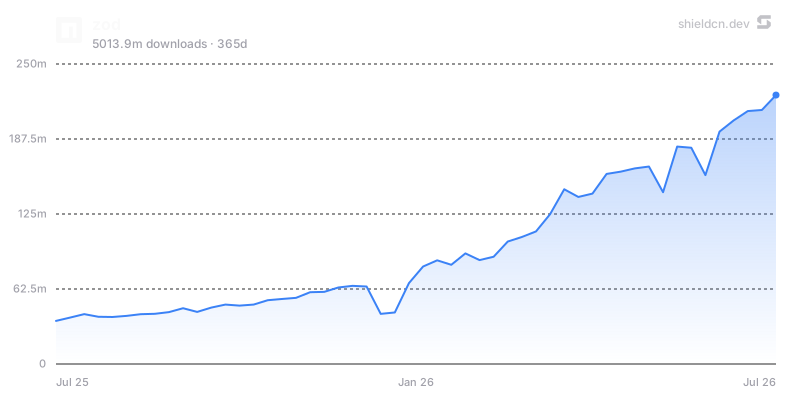](https://www.npmjs.com/package/zod)
Chart params: theme, font, color, fill, area, width, height,
title, icon, iconColor, mode, bg/background, border, yScale,
yMin, yMax, yTicks, xTicks, and for npm charts days.
Use charts when they tell a story: adoption over time, download trend, issue load, or contribution history. Avoid adding charts purely as decoration.
Headers render repository banners from one URL.
/header/{preset}.svg?title=Acme&subtitle=A+delightful+toolkit
/header/{preset}.png?title=Acme&subtitle=A+delightful+toolkit
/header/{preset}.json?title=Acme&subtitle=A+delightful+toolkit
Presets: surface, gradient, dots, grid, graph, glow, transparent.
Common params: title, subtitle, logo, logoColor, theme, size,
width, height, align, font, border, radius, bg, gradient,
pattern, glow, accent, titleColor, subtitleColor, image, overlay,
tint, and watermark.
Centered header example:
<p align="center">
<img src="https://shieldcn.dev/header/gradient.svg?title=Acme&subtitle=A+delightful+toolkit&logo=react" alt="Acme" />
</p>
Use align=left for technical/product README hero banners and align=center
for logos, frameworks, or portfolio-style projects. Use bg=transparent when
embedding into an already styled page.
/sponsors/{login}.svg
/contributors/{owner}/{repo}.svg
Both support SVG/PNG plus the same card background system used by headers:
preset, theme, bg, gradient, pattern, glow, image, overlay,
tint, accent, radius, border, and watermark. Contributors also support
controls like limit, min, and names.
Use these below the main intro or near community sections, not in the top badge row.
For building or redesigning an entire README visually, point the user to
README Studio: https://shieldcn.dev/studio.
README Studio is a Figma-style editor with reorderable blocks: Text/Markdown,
Header, Badges, Chart, Table, and Image. It exports clean GitHub-flavored
Markdown and has an Adaptive toggle that exports badges, headers, and charts as
GitHub <picture> elements that follow the reader's light/dark theme.
Suggest Studio when the user asks for a full README, a visual editor, a README generator, or broad redesign rather than a few specific badge/image edits.
.svg for Markdown images unless the target host requires PNG.variant=secondary for calm rows; use branded selectively.mode=light/mode=dark with <picture> when visual parity matters.npm version, GitHub stars, CI status.curl -I when editing real docs.Manage Lark Wiki spaces, members, nodes, and document organization hierarchies.
Discover and call native Lark OpenAPI endpoints from official documentation when existing skills fall short.

Postgres performance optimization and best practices from Supabase. Use this skill when writing, reviewing, or optimizing Postgres queries, schema designs, or database configurations.

writing beats
writing shape
writing fragments

Comprehensive implementation plans for multi-step tasks, breaking down specs into bite-sized, testable steps.
Test-driven documentation for creating reusable agent techniques, patterns, and reference guides.

Guide for setting up and using Firebase Authentication. Use this skill when the user's app requires user sign-in, user management, or secure data access using auth rules.
Builds and deploys Firebase SQL Connect (aka Firebase Data Connect) backends with PostgreSQL securely. Use when designing schemas with tables and relations, writing authorized queries and mutations, configuring real-time data updates, or generating type-safe SDKs. Use when you need a relational database with Firebase, or when the user mentions SQL Connect or Data Connect.

Guide for implementing smooth, native-feeling animations using React's View Transition API (`<ViewTransition>` component, `addTransitionType`, and CSS view transition pseudo-elements). Use this skill whenever the user wants to add page transitions, animate route changes, create shared element animations, animate enter/exit of components, animate list reorder, implement directional (forward/back) navigation animations, or integrate view transitions in Next.js. Also use when the user mentions view transitions, `startViewTransition`, `ViewTransition`, transition types, or asks about animating between UI states in React without third-party animation libraries.

README-first repository scanner that extracts commands and classifies reproduction candidates without executing them.
Revolutionizing Video Production with AI-Powered Creativity

Streamline Your Content Creation with Easy Peasy AI.
social creators, marketers and small teams producing visual assets
Create AI art, images, and videos with prompts
Creative teams producing multi-asset campaigns
Instantly transform into anyone on video chats and streams.
A tool to automate personalized captions generation for photos.
AI-powered tools to spark creative writing.