
Downloads · 30 days
0
vict0rsch/climateGAN
climateGAN is a machine learning model from vict0rsch. Use it for the machine learning task on the model card, and read the license before you ship it in a product. The card lists the license as gpl-3.0.
This repository contains the code used to train the model presented in our paper.
Downloads · 30 days
0
Access
Public
Updated Oct 27, 2022
Repo size
1.8 GB
Likes
2
Public
Click a slice to open those files.
.pth1.8 GB · 97%
From the Hugging Face model README
This repository contains the code used to train the model presented in our paper.
It is not simply a presentation repository but the code we have used over the past 30 months to come to our final architecture. As such, you will find many scripts, classes, blocks and options which we actively use for our own development purposes but are not directly relevant to reproduce results or use pretrained weights.
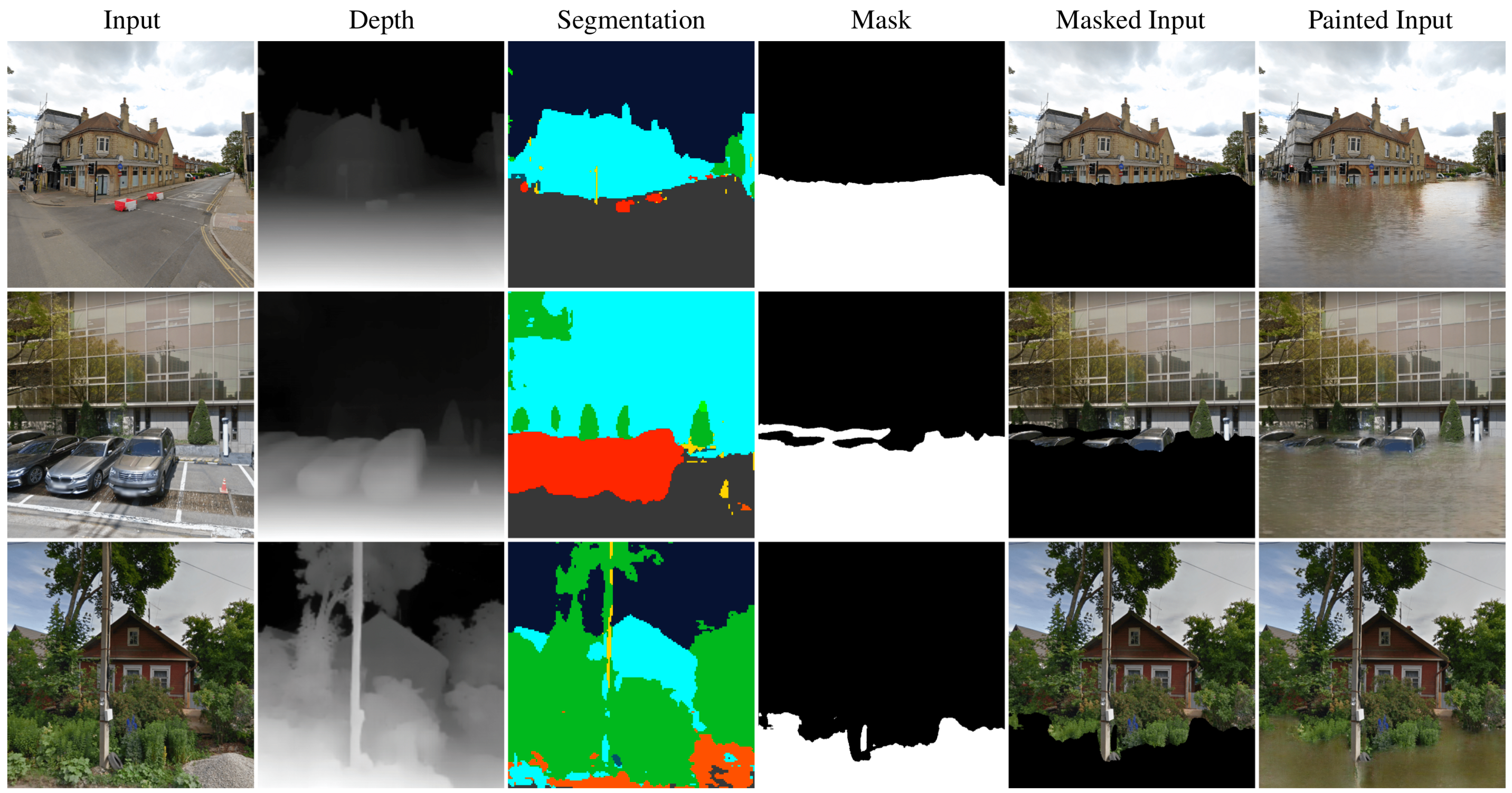
If you use this code, data or pre-trained weights, please cite our ICLR 2022 paper:
@inproceedings{schmidt2022climategan,
  title     = {Climate{GAN}: Raising Climate Change Awareness by Generating Images of Floods},
  author    = {Victor Schmidt and Alexandra Luccioni and M{\'e}lisande Teng and Tianyu Zhang and Alexia Reynaud and Sunand Raghupathi and Gautier Cosne and Adrien Juraver and Vahe Vardanyan and Alex Hern{\'a}ndez-Garc{\'\i}a and Yoshua Bengio},
  booktitle = {International Conference on Learning Representations},
  year      = {2022},
  url       = {https://openreview.net/forum?id=EZNOb_uNpJk}
}
git lfs install
git clone https://huggingface.co/vict0rsch/climateGAN
git lfs pull # optional if you don't have the weights
pip install requirements.txt
$ huggingface-cli login$ python climategan_wrapper.py help for usage instructions on how to infer on a folder's images.$ python app.py to see the Gradio app.
GMAPS_API_KEY environment variable.$ huggingface-cli login (on a Huggingface Space for instance) set the HF_AUTH_TOKEN env variable to a Huggingface authorization tokenCG_DEV_MODE environment variable to true.For a more fine-grained control on ClimateGAN's inferences, refer to apply_events.py (does not support Stable Diffusion painter)
Note: you don't have control on the prompt by design because I disabled the safety checker. Fork this space/repo and do it yourself if you really need to change the prompt. At least open a discussion.
In the paper, we present ClimateGAN as a solution to produce images of floods. It can actually do more:
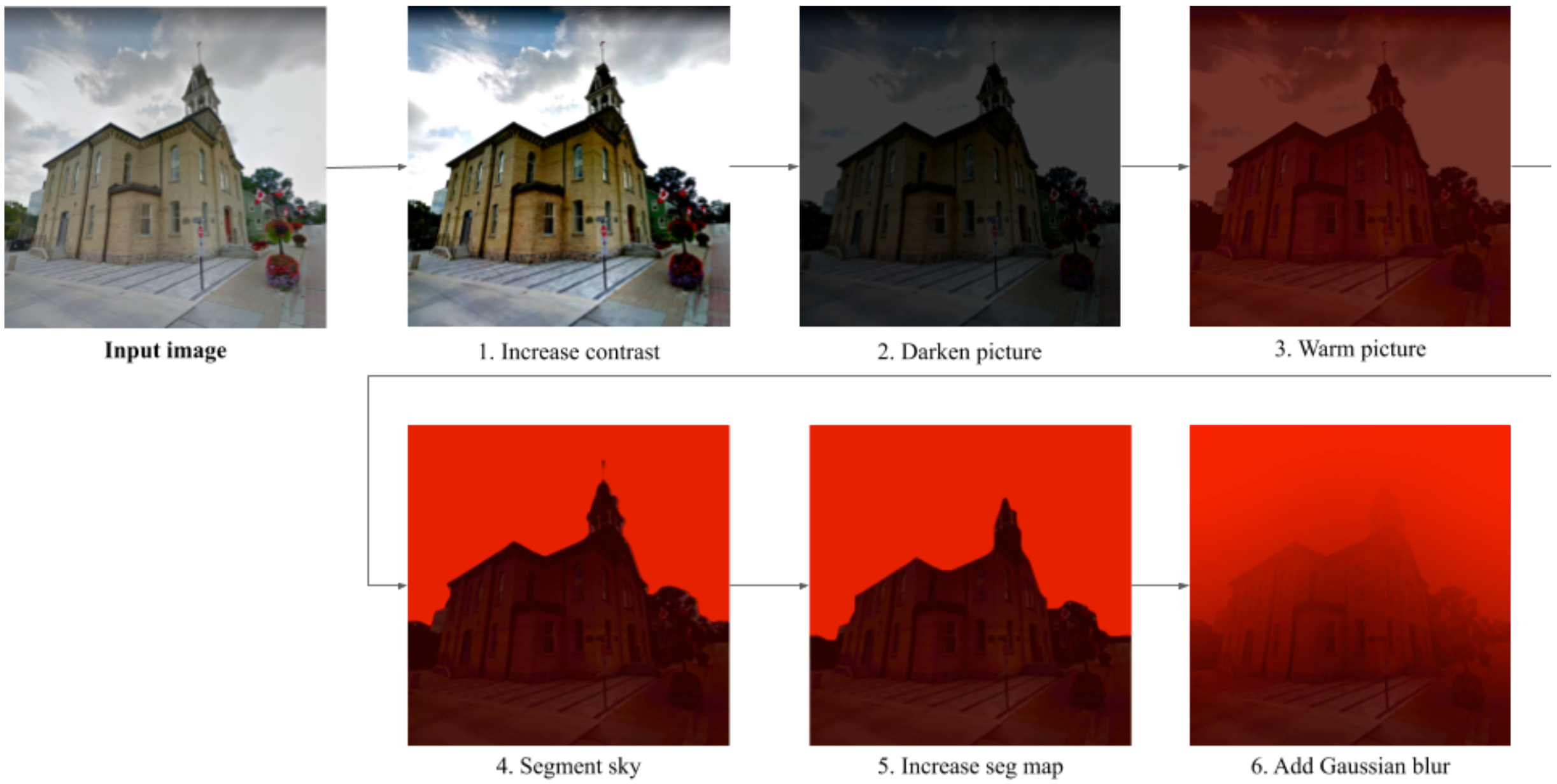
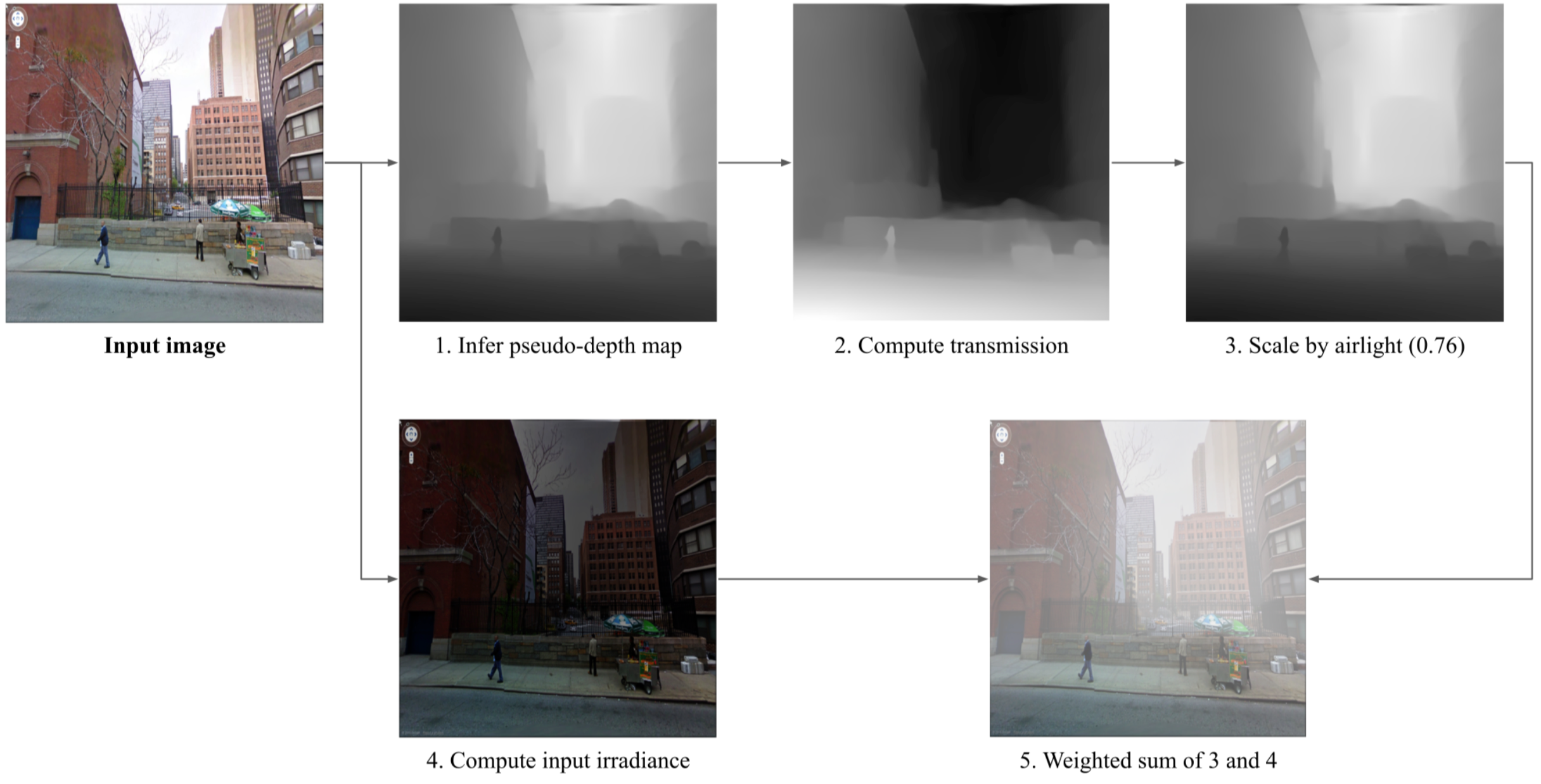
In this section we'll explain how to produce the Painted Input along with the Smog and Wildfire outputs of a pre-trained ClimateGAN model.
This repository and associated model have been developed using Python 3.8.2 and Pytorch 1.7.0.
$ git clone [email protected]:cc-ai/climategan.git
$ cd climategan
$ pip install -r requirements-3.8.2.txt # or `requirements-any.txt` for other Python versions (not tested but expected to be fine)
Our pipeline uses comet.ml to log images. You don't have to use their services but we recommend you do as images can be uploaded on your workspace instead of being written to disk.
If you want to use Comet, make sure you have the appropriate configuration in place (API key and workspace at least)
gdown for a commandline interface) and put them in config/$ pip install gdown
$ mkdir config
$ cd config
$ gdown https://drive.google.com/u/0/uc?id=18OCUIy7JQ2Ow_-cC5xn_hhDn-Bp45N1K
$ unzip release-github-v1.zip
$ cd ..
Run from the repo's root:
comet:python apply_events.py --batch_size 4 --half --images_paths path/to/a/folder --resume_path config/model/masker --upload
comet (and shortened args compared to the previous example):python apply_events.py -b 4 --half -i path/to/a/folder -r config/model/masker --output_path path/to/a/folder
The apply_events.py script has many options, for instance to use a different output size than the default systematic 640 x 640 pixels, look at the code or python apply_events.py --help.
ClimateGAN is split in two main components: the Masker producing a binary mask of where water should go and the Painter generating water within this mask given an initial image's context.
The code is structured to use shared/trainer/defaults.yaml as default configuration. There are 2 ways of overriding those for your purposes (without altering that file):
By providing an alternative configuration as command line argument config=path/to/config.yaml
shared/trainer/defaults.yamlconfig argument.config/ is NOT tracked by git so you would typically put them thereBy overwriting specific arguments from the command-line like python train.py data.loaders.batch_size=8
Because of copyrights issues we are not able to share the real images scrapped from the internet. You would have to do that yourself. In the yaml config file, the code expects a key pointing to a json file like data.files.<train or val>.r: <path/to/a/json/file>. This json file should be a list of dictionaries with tasks as keys and files as values. Example:
[
    {
    "x": "path/to/a/real/image",
    "s": "path/to/a/segmentation_map",
    "d": "path/to/a/depth_map"
    },
...
]
Following the ADVENT procedure, only x should be required. We use s and d inferred from pre-trained models (DeepLab v3+ and MiDAS) to use those pseudo-labels in the first epochs of training (see pseudo: in the config file)
We share snapshots of the Virtual World we created in the Mila-Simulated-Flood dataset. You can download and unzip one water-level and then produce json files similar to that of the real data, with an additional key "m": "path/to/a/ground_truth_sim_mask". Lastly, edit the config file: data.files.<train or val>.s: <path/to/a/json/file>
The painter expects input images and binary masks to train using the GauGAN training procedure. Unfortunately we cannot share openly the collected data, but similarly as for the Masker's real data you would point to the data using a json file as:
[
    {
    "x": "path/to/a/real/image",
    "m": "path/to/a/water_mask",
    },
...
]
And put those files as values to data.files.<train or val>.rf: <path/to/a/json/file> in the configuration.
x is an input image, in [-1, 1]s is a segmentation target with long classesd is a depth map target in R, may be actually log(depth) or 1/depthm is a binary mask with 1s where water is/should ber is the real domain for the masker. Input images are real pictures of urban/suburban/rural areass is the simulated domain for the masker. Input images are taken from our Unity worldrf is the real flooded domain for the painter. Training images are pairs (x, m) of flooded scenes for which the water should be reconstructed, in the validation data input images are not flooded and we provide a manually labeled mask mkitti is a special s domain to pre-train the masker on Virtual Kitti 2
trainer.loaders dict to select relevant data sources from trainer.all_loaders in trainer.switch_data(). The rest of the code is identical.train()
run_epoch()
update_G()
zero_grad(G)get_G_loss()
get_masker_loss()
masker_m_loss() -> masking lossmasker_s_loss() -> segmentation lossmasker_d_loss() -> depth estimation lossget_painter_loss() -> painter's lossg_loss.backward()g_opt_step()update_D()
zero_grad(D)get_D_loss()
masker_m_loss() -> masking AdvEnt disc lossmasker_s_loss() -> segmentation AdvEnt disc lossd_loss.backward()d_opt_step()update_learning_rates() -> update learning rates according to schedules defined in opts.gen.opt and opts.dis.optrun_validation()
eval_images() -> compute metricslog_comet_images() -> compute and upload inferencessave()