
Downloads · 30 days
0
0% of all-time downloads
theantiquepiece/thefalcon
thefalcon is a text-to-image model from theantiquepiece. Use it when you need an image from a text prompt. It is set up for diffusers. The card lists the license as apache-2.0.
This repository contains the implementation of the Stable Diffusion model using PyTorch and Hugging Face Diffusers. Stable Diffusion is a text-to-image generative model that leverages a diffusion process to generate h…
Downloads · 30 days
0
0% of all-time downloads
All-time downloads
79
Public
Repo size
—
Likes
0
Public
Click a slice to open those files.
.png895 KB · 98%
From the Hugging Face model README
This repository contains the implementation of the Stable Diffusion model using PyTorch and Hugging Face Diffusers. Stable Diffusion is a text-to-image generative model that leverages a diffusion process to generate high-quality, detailed images from textual descriptions.
To get started, you'll need to clone this repository and install the required dependencies. We recommend using a virtual environment to avoid conflicts.
git clone https://github.com/the-antique-piece/stable_diffusion.git
cd stable_diffusion

# Create and activate a virtual environment (optional)
python -m venv venv
source venv/bin/activate  # On Windows use `venv\Scripts\activate`

# Install required dependencies
pip install -r requirements.txt
To install all dependencies manually, you can run:
pip install torch diffusers transformers datasets pillow flax
Stable Diffusion is a latent diffusion model that is trained to denoise a latent representation of the image, conditioned on a text prompt. It operates by gradually reversing a noise process applied to the data during training, allowing it to generate images starting from pure noise.
This repository implements the following features:
The Stable Diffusion model consists of:
Once the environment is set up, you can generate images from text prompts as follows:
from diffusers import DiffusionPipeline
import torch

# Remove torch_dtype=torch.float16
pipeline = DiffusionPipeline.from_pretrained("stable-diffusion/stable-diffusion-v1")

# Use a Nvidia GPU if available, or else cpu
device = torch.device("cuda" if torch.cuda.is_available() else "cpu")
pipeline.to(device)

pipeline("An image of futuristic city where everyting is perfect").images[0]
If You don't running this model on nvidia GPU change torch_type=torch.float32
from diffusers import DiffusionPipeline
import torch
# Provide a path to directory where the model_index.json is placed
weights_path = "directory_path_to_model_index.json"
pipeline = DiffusionPipeline.from_pretrained(weights_path, torch_dtype=torch.float16)
# You can change prompt to get different photos, increase inference_steps's value to get high quality images
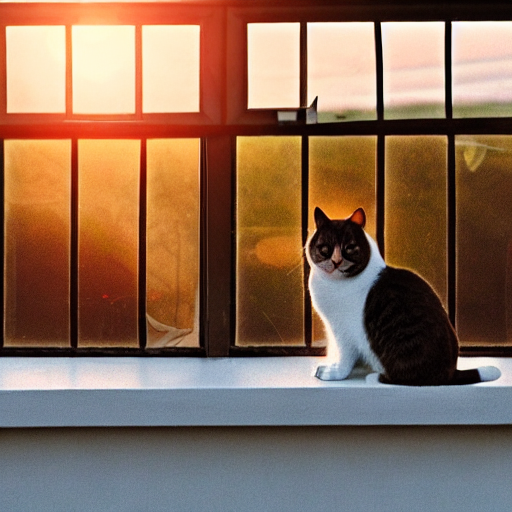
prompt = 'a cat sitting on a windowsill, looking at the sunset'
height, width = 512, 512
num_inference_steps = 50

image = pipeline(prompt, height=height, width=width, num_inference_steps=num_inference_steps).images[0]
image.save("myimage.png")
If you have custom model weights, load them into the pipeline:
pipe = StableDiffusionPipeline.from_pretrained("path/to/your/model").to("cuda")
This repository also supports fine-tuning the Stable Diffusion model on your own dataset. To prepare for training:
datasets library.python train.py --dataset_path /path/to/dataset --output_dir /path/to/output --batch_size 8 --learning_rate 5e-5 --num_epochs 10
Training can be done with the train.py script, which supports distributed training for large datasets and multiple GPUs.
To run inference on a trained model, use the inference.py script:
python inference.py --model_path /path/to/trained/model --prompt "a futuristic city skyline at sunset"
Here are some example prompts and the corresponding generated images:
Prompt: "a cat sitting on a windowsill, looking at the sunset"
Prompt: "a futuristic cityscape with flying cars"

This implementation is based on the Stable Diffusion model by Huggingface and utilizes the Huggingface Diffusers library.
This project is licensed under the terms of the Apache 2.0 License.