
Downloads · 30 days
1.2K
4% of all-time downloads
raulc0399/flux_dev_openpose_controlnet
flux_dev_openpose_controlnet is a text-to-image model from raulc0399. Use it when you need an image from a text prompt. It is set up for diffusers. The card lists the license as other.
(big thanks to oxen.ai for sponsoring the GPU for the training)
Downloads · 30 days
1.2K
4% of all-time downloads
All-time downloads
30.5K
Public
Parameters
744M
3 GB on disk
Likes
53
Public
Click a slice to open those files.
.safetensors3 GB · 100%
From the Hugging Face model README
(big thanks to oxen.ai for sponsoring the GPU for the training)
an openpose controlnet for flux-dev, trained on https://huggingface.co/datasets/raulc0399/open_pose_controlnet
the controlnet model is trained for the xlabs ai pipeline https://github.com/XLabs-AI/x-flux
to install the pipeline, execute the following:
git clone https://github.com/XLabs-AI/x-flux.git
cd x-flux
python3 -m venv xflux_env
source xflux_env/bin/activate
pip install -r requirements.txt
to run the pipeline with controlnet:
python3 main.py \
 --prompt "person enjoying a day at the park, full hd, cinematic" \
 --image ~/open_pose_controlnet_dataset/validation_images/pose/3_pose_1024.jpg --control_type openpose \
 --local_path ./model.safetensors \
 --use_controlnet --model_type flux-dev \
 --width 1024 --height 1024  --timestep_to_start_cfg 2 \
 --num_steps 50 --true_gs 4 --guidance 4 \
 --save_path ~/gen_imgs
if the image has already been preprocessed comment out the line #146 from src/flux/xflux_pipeline.py
# self.annotator = Annotator(control_type, self.other_device)
oxen clone https://hub.oxen.ai/raulc/open_pose_controlnet_dataset
git clone https://github.com/raulc0399/x-flux.git
cd x-flux
git checkout open_pose_training
python3 -m venv xflux_env
source xflux_env/bin/activate
pip install -r requirements.txt
huggingface-cli login
accelerate config
mkdir images
rsync -r ~/open_pose_controlnet_dataset/train/images/ images/
cp train_configs/test_openpose_controlnet.yaml train_configs/openpose_controlnet.yaml
accelerate launch train_flux_deepspeed_controlnet.py --config "train_configs/openpose_controlnet.yaml"
note 1: check the file train_configs/openpose_controlnet.yaml before starting
note 2: rsync is needed, cp does not work with that many files
note 3: the oxen repo has the caption files as json as expected by the training script
using these 2 images:
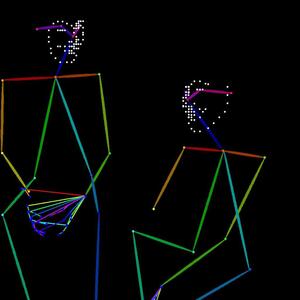
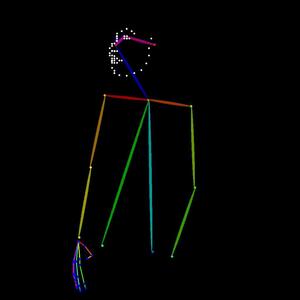
with these prompts:
"two friends sitting by each other enjoying a day at the park, full hd, cinematic" "person enjoying a day at the park, full hd, cinematic"
resulted in these images:


Weights fall under the FLUX.1 [dev] Non-Commercial License<br/>