
Downloads · 30 days
499
6% of all-time downloads
pek111/llama-3-typhoon-v1.5-8b-instruct-GGUF
llama-3-typhoon-v1.5-8b-instruct-GGUF is a text generation model from pek111. Use it when you need the model to write or continue text. The card lists the license as llama3.
This repo contains GGUF format model files for SCB 10X's Llama 3 Typhoon v1.5 8B Instruct.
Downloads · 30 days
499
6% of all-time downloads
All-time downloads
7.8K
Public
Repo size
72 GB
Likes
0
Public
Click a slice to open those files.
.gguf72 GB · 100%
From the Hugging Face model README
This repo contains GGUF format model files for SCB 10X's Llama 3 Typhoon v1.5 8B Instruct.
You can jump to downloads.
GGUF is a new format introduced by the llama.cpp team on August 21st, 2023. It is a replacement for GGML, which is no longer supported by llama.cpp. GGUF offers numerous advantages over GGML, such as better tokenization, and support for special tokens. It also supports metadata and is designed to be extensible.
Here is an incomplete list of clients and libraries that are known to support GGUF:
Llama 3 chat template
<|begin_of_text|><|start_header_id|>system<|end_header_id|>

You are a helpful assistant who're always speak Thai.<|eot_id|><|start_header_id|>user<|end_header_id|>

1+1 เท่ากับเท่าไหร่<|eot_id|><|start_header_id|>assistant<|end_header_id|>

1+1 เท่ากับ 2 ครับ<|eot_id|>
These quantised GGUFv2 files are compatible with llama.cpp from August 27th onwards, as of commit d0cee0d36d5be95a0d9088b674dbb27354107221
They are also compatible with many third-party UIs and libraries - please see the list at the top of this README.
The new methods available are:
Refer to the Provided Files table below to see what files use which methods, and how.
</details>| Name | Quant method | Bits | Size | Use case |
|---|---|---|---|---|
| llama-3-typhoon-v1.5-8b-instruct.Q2_K.gguf | Q2_K | 2 | 2.95 GB | smallest, significant quality loss - not recommended for most purposes |
| llama-3-typhoon-v1.5-8b-instruct.Q3_K_S.gguf | Q3_K_S | 3 | 3.41 GB | very small, high quality loss |
| llama-3-typhoon-v1.5-8b-instruct.Q3_K_M.gguf | Q3_K_M | 3 | 3.74 GB | very small, high quality loss |
| llama-3-typhoon-v1.5-8b-instruct.Q3_K_L.gguf | Q3_K_L | 3 | 4.02 GB | small, substantial quality loss |
| llama-3-typhoon-v1.5-8b-instruct.Q4_0.gguf | Q4_0 | 4 | 4.34 GB | legacy; small, very high quality loss - prefer using Q3_K_M |
| llama-3-typhoon-v1.5-8b-instruct.Q4_K_S.gguf | Q4_K_S | 4 | 4.37 GB | small, greater quality loss |
| llama-3-typhoon-v1.5-8b-instruct.Q4_K_M.gguf | Q4_K_M | 4 | 4.58 GB | medium, balanced quality - recommended |
| llama-3-typhoon-v1.5-8b-instruct.Q5_0.gguf | Q5_0 | 5 | 5.21 GB | legacy; medium, balanced quality - prefer using Q4_K_M |
| llama-3-typhoon-v1.5-8b-instruct.Q5_K_S.gguf | Q5_K_S | 5 | 5.21 GB | large, low quality loss - recommended |
| llama-3-typhoon-v1.5-8b-instruct.Q5_K_M.gguf | Q5_K_M | 5 | 5.33 GB | large, very low quality loss - recommended |
| llama-3-typhoon-v1.5-8b-instruct.Q6_K.gguf | Q6_K | 6 | 6.14 GB | very large, extremely low quality loss |
| llama-3-typhoon-v1.5-8b-instruct.Q8_0.gguf | Q8_0 | 8 | 7.95 GB | very large, extremely low quality loss - not recommended |
| llama-3-typhoon-v1.5-8b-instruct.BF16.gguf | BF16 | 16 | 14.97 GB | largest, original quality - not recommended |
Note for manual downloaders: You rarely want to clone the entire repo! Multiple different quantization formats are provided, and most users only want to pick and download a single file.
The following clients/libraries will automatically download models for you, providing a list of available models to choose from:
text-generation-webuiUnder Download Model, you can enter the model repo: pek111/llama-3-typhoon-v1.5-8b-instruct-GGUF, and below it, a specific filename to download, such as tc-instruct-dpo.Q4_K_M.gguf.
Then click Download.
I recommend using the huggingface-hub Python library:
pip3 install huggingface-hub>=0.17.1
Then you can download any individual model file to the current directory, at high speed, with a command like this:
huggingface-cli download pek111/llama-3-typhoon-v1.5-8b-instruct-GGUF llama-3-typhoon-v1.5-8b-instruct.Q4_K_M.gguf --local-dir . --local-dir-use-symlinks False
You can also download multiple files at once with a pattern:
huggingface-cli download pek111/llama-3-typhoon-v1.5-8b-instruct-GGUF --local-dir . --local-dir-use-symlinks False --include='*Q4_K*gguf'
For more documentation on downloading with huggingface-cli, please see: HF -> Hub Python Library -> Download files -> Download from the CLI.
To accelerate downloads on fast connections (1Gbit/s or higher), install hf_transfer:
pip3 install hf_transfer
And set environment variable HF_HUB_ENABLE_HF_TRANSFER to 1:
HUGGINGFACE_HUB_ENABLE_HF_TRANSFER=1 huggingface-cli download pek111/llama-3-typhoon-v1.5-8b-instruct-GGUF llama-3-typhoon-v1.5-8b-instruct.Q4_K_M.gguf --local-dir . --local-dir-use-symlinks False
Windows CLI users: Use set HUGGINGFACE_HUB_ENABLE_HF_TRANSFER=1 or $env:HUGGINGFACE_HUB_ENABLE_HF_TRANSFER=1 before running the download command.
llama.cpp commandMake sure you are using llama.cpp from commit d0cee0d36d5be95a0d9088b674dbb27354107221 or later.
./main -ngl 32 -m tc-instruct-dpo.Q4_K_M.gguf --color -c 4096 --temp 0.7 --repeat_penalty 1.1 -n -1 -p "{prompt}"
Change -ngl 32 to the number of layers to offload to GPU. Remove it if you don't have GPU acceleration.
Change -c 4096 to the desired sequence length. For extended sequence models - eg 8K, 16K, 32K - the necessary RoPE scaling parameters are read from the GGUF file and set by llama.cpp automatically.
If you want to have a chat-style conversation, replace the -p <PROMPT> argument with -i -ins
For other parameters and how to use them, please refer to the llama.cpp documentation
text-generation-webuiFurther instructions here: text-generation-webui/docs/llama.cpp.md.
You can use GGUF models from Python using the llama-cpp-python or ctransformers libraries.
# Base llama-cpp-python with no GPU acceleration
pip install llama-cpp-python
# With NVidia CUDA acceleration
CMAKE_ARGS="-DLLAMA_CUBLAS=on" pip install llama-cpp-python
# Or with OpenBLAS acceleration
CMAKE_ARGS="-DLLAMA_BLAS=ON -DLLAMA_BLAS_VENDOR=OpenBLAS" pip install llama-cpp-python
# Or with CLBLast acceleration
CMAKE_ARGS="-DLLAMA_CLBLAST=on" pip install llama-cpp-python
# Or with AMD ROCm GPU acceleration (Linux only)
CMAKE_ARGS="-DLLAMA_HIPBLAS=on" pip install llama-cpp-python
# Or with Metal GPU acceleration for macOS systems only
CMAKE_ARGS="-DLLAMA_METAL=on" pip install llama-cpp-python

# In Windows, to set the variables CMAKE_ARGS in PowerShell, follow this format; eg for Nvidia CUDA:
$env:CMAKE_ARGS = "-DLLAMA_CUDA=on"
pip install llama_cpp_python --verbose
# If BLAS = 0 try installing with these commands instead (Windows + CUDA)
set CMAKE_ARGS="-DLLAMA_CUDA=on"
set FORCE_CMAKE=1
$env:CMAKE_ARGS = "-DLLAMA_CUDA=on"
$env:FORCE_CMAKE = 1
python -m pip install llama_cpp_python>=0.2.26 --verbose --force-reinstall --no-cache-dir
import llama_cpp

llm_cpp = llama_cpp.Llama(
    model_path="models/llama-3-typhoon-v1.5-8b-instruct.Q6_K.gguf",  # Path to the model
    n_threads=10,  # CPU cores
    n_batch=512,  # Should be between 1 and n_ctx, consider the amount of VRAM in your GPU.
    n_gpu_layers=33,  # Change this value based on your model and your GPU VRAM pool.
    n_ctx=2048,  # Max context length
)

prompt = """
<|begin_of_text|><|start_header_id|>system<|end_header_id|>

You are a helpful assistant who're always speak Thai.<|eot_id|><|start_header_id|>user<|end_header_id|>

1+1 เท่ากับเท่าไหร่<|eot_id|><|start_header_id|>assistant<|end_header_id|>

"""

response = llm_cpp(
    prompt=prompt,
    max_tokens=256,
    temperature=0.5,
    top_k=1,
    repeat_penalty=1.1,
    echo=True
)

print(response)
{
    "id": "cmpl-b0971ce1-1607-42b3-b6dd-8bf8e324307a",
    "object": "text_completion",
    "created": 1721478196,
    "model": "models/llama-3-typhoon-v1.5-8b-instruct.Q6_K.gguf",
    "choices": [
        {
            "text": "\n<|begin_of_text|><|start_header_id|>system<|end_header_id|>\n\nYou are a helpful assistant who're always speak Thai.<|eot_id|><|start_header_id|>user<|end_header_id|>\n\n1+1 เท่ากับเท่าไหร่<|eot_id|><|start_header_id|>assistant<|end_header_id|>\n\n2",
            "index": 0,
            "logprobs": None,
            "finish_reason": "stop",
        }
    ],
    "usage": {"prompt_tokens": 41, "completion_tokens": 2, "total_tokens": 43},
}
Here are guides on using llama-cpp-python or ctransformers with LangChain:
Llama-3-Typhoon-1.5-8B: Thai Large Language Model (Instruct)
Llama-3-Typhoon-1.5-8B-instruct is a instruct Thai 🇹🇭 large language model with 8 billion parameters, and it is based on Llama3-8B.
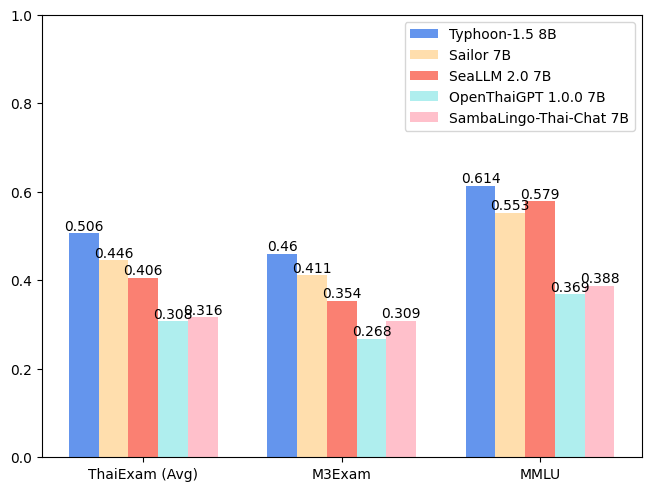
For release post, please see our blog. *To acknowledge Meta's effort in creating the foundation model and to comply with the license, we explicitly include "llama-3" in the model name.
| Model | ONET | IC | TGAT | TPAT-1 | A-Level | Average (ThaiExam) | M3Exam | MMLU |
|---|---|---|---|---|---|---|---|---|
| Typhoon-1.0 (Mistral) | 0.379 | 0.393 | 0.700 | 0.414 | 0.324 | 0.442 | 0.391 | 0.547 |
| Typhoon-1.5 8B (Llama3) | 0.446 | 0.431 | 0.722 | 0.526 | 0.407 | 0.506 | 0.460 | 0.614 |
| Sailor 7B | 0.372 | 0.379 | 0.678 | 0.405 | 0.396 | 0.446 | 0.411 | 0.553 |
| SeaLLM 2.0 7B | 0.327 | 0.311 | 0.656 | 0.414 | 0.321 | 0.406 | 0.354 | 0.579 |
| OpenThaiGPT 1.0.0 7B | 0.238 | 0.249 | 0.444 | 0.319 | 0.289 | 0.308 | 0.268 | 0.369 |
| SambaLingo-Thai-Chat 7B | 0.251 | 0.241 | 0.522 | 0.302 | 0.262 | 0.316 | 0.309 | 0.388 |
from transformers import AutoTokenizer, AutoModelForCausalLM
import torch

model_id = "scb10x/llama-3-typhoon-v1.5-8b-instruct"

tokenizer = AutoTokenizer.from_pretrained(model_id)
model = AutoModelForCausalLM.from_pretrained(
    model_id,
    torch_dtype=torch.bfloat16,
    device_map="auto",
)

messages = [
    {"role": "system", "content": "You are a helpful assistant who're always speak Thai."},
    {"role": "user", "content": "ขอสูตรไก่ย่าง"},
]

input_ids = tokenizer.apply_chat_template(
    messages,
    add_generation_prompt=True,
    return_tensors="pt"
).to(model.device)

terminators = [
    tokenizer.eos_token_id,
    tokenizer.convert_tokens_to_ids("<|eot_id|>")
]

outputs = model.generate(
    input_ids,
    max_new_tokens=512,
    eos_token_id=terminators,
    do_sample=True,
    temperature=0.4,
    top_p=0.9,
)
response = outputs[0][input_ids.shape[-1]:]
print(tokenizer.decode(response, skip_special_tokens=True))
We use llama3 chat-template.
{% set loop_messages = messages %}{% for message in loop_messages %}{% set content = '<|start_header_id|>' + message['role'] + '<|end_header_id|>\n\n'+ message['content'] | trim + '<|eot_id|>' %}{% if loop.index0 == 0 %}{% set content = bos_token + content %}{% endif %}{{ content }}{% endfor %}{% if add_generation_prompt %}{{ '<|start_header_id|>assistant<|end_header_id|>\n\n' }}{% endif %}
This model is an instructional model. However, it’s still undergoing development. It incorporates some level of guardrails, but it still may produce answers that are inaccurate, biased, or otherwise objectionable in response to user prompts. We recommend that developers assess these risks in the context of their use case.
https://twitter.com/opentyphoon
@article{pipatanakul2023typhoon,
    title={Typhoon: Thai Large Language Models},
    author={Kunat Pipatanakul and Phatrasek Jirabovonvisut and Potsawee Manakul and Sittipong Sripaisarnmongkol and Ruangsak Patomwong and Pathomporn Chokchainant and Kasima Tharnpipitchai},
    year={2023},
    journal={arXiv preprint arXiv:2312.13951},
    url={https://arxiv.org/abs/2312.13951}
}