
Downloads · 30 days
11
2% of all-time downloads
nicolas-dufour/CAD_512
CAD_512 is a text-to-image model from nicolas-dufour. Use it when you need an image from a text prompt. The card lists the license as mit.
- Library: https://github.com/nicolas-dufour/CAD <div align="center"
Downloads · 30 days
11
2% of all-time downloads
All-time downloads
472
Public
Parameters
332M
2.7 GB on disk
Likes
0
Public
Click a slice to open those files.
.safetensors1.3 GB · 100%
How the weights are stored.
F32332M · 100%
From the Hugging Face model README
<a href="https://nicolas-dufour.github.io/" >Nicolas Dufour</a>, <a href="https://scholar.google.com/citations?user=n_C2h-QAAAAJ&hl=fr&oi=ao" >Victor Besnier</a>, <a href="https://vicky.kalogeiton.info/" >Vicky Kalogeiton</a>, <a href="https://davidpicard.github.io/" >David Picard</a>
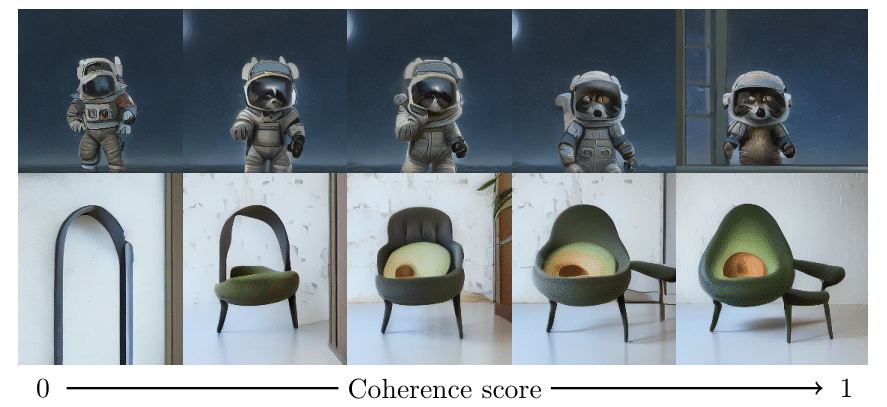
The core idea is that diffusion model is usually trained on noisy data. The usual solution is to filter massive datapools. We propose a new training method that leverages the coherence of the data to improve the training of diffusion models. We show that this method improves the quality of the generated samples on several datasets.
Project website: https://nicolas-dufour.github.io/cad
To install, first create a conda env with python 3.10
conda create -n cad python=3.10
Activate the env
conda activate cad
For inference only,
pip install cad-diffusion
To use the pretrained model do the following:
from cad import CADT2IPipeline

pipe = CADT2IPipeline("nicolas-dufour/CAD_512").to("cuda")

prompt = "An avocado armchair"

image = pipe(prompt, cfg=15)
If you just want to download the models, not the sampling pipeline, you can do:
from cad import CAD

model = CAD.from_pretrained("nicolas-dufour/CAD_512")
Models are hosted in the hugging face hub. The previous scripts download them automatically, but weights can be found at:
https://huggingface.co/nicolas-dufour/CAD_256
https://huggingface.co/nicolas-dufour/CAD_512
The CADT2IPipeline class provides a comprehensive interface for generating images from text prompts. Here's a detailed guide on how to use it:
from cad import CADT2IPipeline

# Initialize the pipeline
pipe = CADT2IPipeline("nicolas-dufour/CAD_512").to("cuda")

# Generate an image from a prompt
prompt = "An avocado armchair"
image = pipe(prompt, cfg=15)
The pipeline can be initialized with several customization options:
pipe = CADT2IPipeline(
    model_path="nicolas-dufour/CAD_512",
    sampler="ddim",                    # Options: "ddim", "ddpm", "dpm", "dpm_2S", "dpm_2M"
    scheduler="sigmoid",               # Options: "sigmoid", "cosine", "linear"
    postprocessing="sd_1_5_vae",      # Options: "consistency-decoder", "sd_1_5_vae"
    scheduler_start=-3,
    scheduler_end=3,
    scheduler_tau=1.1,
    device="cuda"
)
The pipeline's __call__ method accepts various parameters to control the generation process:
image = pipe(
    cond="A beautiful landscape",          # Text prompt or list of prompts
    num_samples=4,                         # Number of images to generate
    cfg=15,                               # Classifier-free guidance scale
    guidance_type="constant",             # Type of guidance: "constant", "linear"
    guidance_start_step=0,                # Step to start guidance
    coherence_value=1.0,                  # Coherence value for sampling
    uncoherence_value=0.0,                # Uncoherence value for sampling
    thresholding_type="clamp",           # Type of thresholding: "clamp", "dynamic_thresholding", "per_channel_dynamic_thresholding"
    clamp_value=1.0,                      # Clamp value for thresholding
    thresholding_percentile=0.995         # Percentile for thresholding
)
constant: Applies uniform guidance throughout the sampling processlinear: Linearly increases guidance strength from start to endexponential: Exponentially increases guidance strength from start to endclamp: Clamps values to a fixed range using clamp_valuedynamic: Dynamically adjusts thresholds based on the batch statisticspercentile: Uses percentile-based thresholding with thresholding_percentileFor more control over the generation process, you can also specify:
x_N: Initial noise tensorlatents: Previous latents for continuationnum_steps: Custom number of sampling stepssampler: Custom sampler functionscheduler: Custom scheduler functionguidance_start_step: Step to start guidancegenerator: Random number generator for reproducibilityunconfident_prompt: Custom unconfident prompt textIf you happen to use this repo in your experiments, you can acknowledge us by citing the following paper:
@article{dufour2024dont,
  title={Don’t drop your samples! Coherence-aware training benefits Conditional diffusion},
  author={Nicolas Dufour and Victor Besnier and Vicky Kalogeiton and David Picard},
  journal={CVPR}
  year={2024}
}