
Downloads · 30 days
21
1% of all-time downloads
llava-hf/llava-onevision-qwen2-72b-si-hf
llava-onevision-qwen2-72b-si-hf is a image-text-to-text model from llava-hf. Use it for the image-text-to-text task on the model card, and read the license before you ship it in a product. It is set up for transformers. The card lists the license as apache-2.0.
Downloads · 30 days
21
1% of all-time downloads
All-time downloads
2.1K
Public
Parameters
73.2B
154 GB on disk
Likes
1
Public
Click a slice to open those files.
.md146 GB · 50%
From the Hugging Face model README
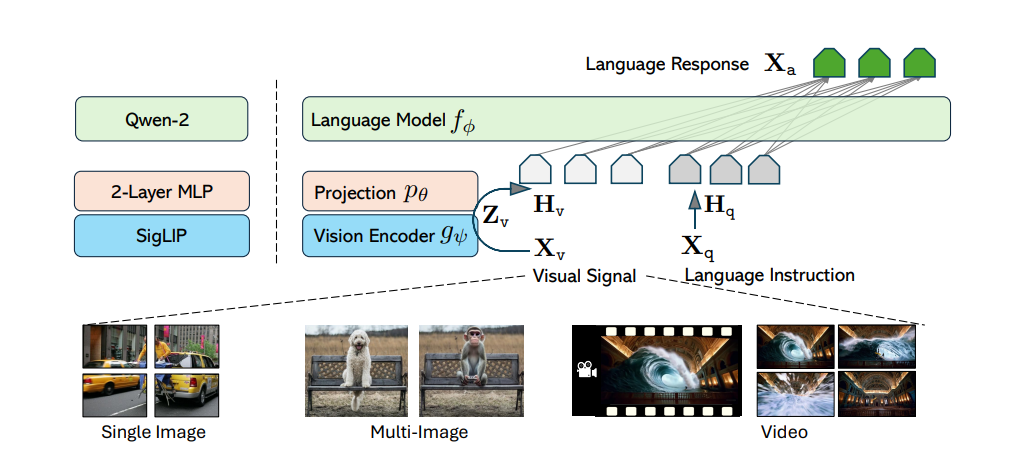
Check out also the Google Colab demo to run Llava on a free-tier Google Colab instance: 
Below is the model card of 72B LLaVA-Onevision model which is copied from the original LLaVA-Onevision model card that you can find here.
Model type: LLaVA-Onevision is an open-source multimodal LLM trained by fine-tuning Qwen2 on GPT-generated multimodal instruction-following data. LLaVA-OneVision is the first single model that can simultaneously push the performance boundaries of open LMMs in three important computer vision scenarios: single-image, multi-image, and video scenarios. Importantly, the design of LLaVA-OneVision allows strong transfer learning across different modalities/scenarios, yielding new emerging capabilities. In particular, strong video understanding and cross-scenario capabilities are demonstrated through task transfer from images to videos.
Model date: LLaVA-Onevision-72b-si was added in August 2024.
Paper or resources for more information: https://llava-vl.github.io/
First, make sure to have transformers installed from branch or transformers >= 4.45.0.
The model supports multi-image and multi-prompt generation. Meaning that you can pass multiple images in your prompt. Make sure also to follow the correct prompt template by applyong chat template:
pipeline:Below we used "llava-hf/llava-onevision-qwen2-72b-si-hf" checkpoint.
from transformers import pipeline, AutoProcessor
from PIL import Image
import requests

model_id = "llava-hf/llava-onevision-qwen2-72b-si-hf"
pipe = pipeline("image-to-text", model=model_id)
processor = AutoProcessor.from_pretrained(model_id)
url = "https://huggingface.co/datasets/huggingface/documentation-images/resolve/main/transformers/tasks/ai2d-demo.jpg"
image = Image.open(requests.get(url, stream=True).raw)

# Define a chat history and use `apply_chat_template` to get correctly formatted prompt
# Each value in "content" has to be a list of dicts with types ("text", "image")
conversation = [
    {

      "role": "user",
      "content": [
          {"type": "text", "text": "What does the label 15 represent? (1) lava (2) core (3) tunnel (4) ash cloud"},
          {"type": "image"},
        ],
    },
]
prompt = processor.apply_chat_template(conversation, add_generation_prompt=True)

outputs = pipe(image, prompt=prompt, generate_kwargs={"max_new_tokens": 200})
print(outputs)
>>> {"generated_text": "user\n\nWhat does the label 15 represent? (1) lava (2) core (3) tunnel (4) ash cloud\nassistant\nLava"}
transformers:Below is an example script to run generation in float16 precision on a GPU device:
import requests
from PIL import Image

import torch
from transformers import AutoProcessor, LlavaOnevisionForConditionalGeneration

model_id = "llava-hf/llava-onevision-qwen2-72b-si-hf"
model = LlavaOnevisionForConditionalGeneration.from_pretrained(
    model_id,
    torch_dtype=torch.float16,
    low_cpu_mem_usage=True,
).to(0)

processor = AutoProcessor.from_pretrained(model_id)

# Define a chat history and use `apply_chat_template` to get correctly formatted prompt
# Each value in "content" has to be a list of dicts with types ("text", "image")
conversation = [
    {

      "role": "user",
      "content": [
          {"type": "text", "text": "What are these?"},
          {"type": "image"},
        ],
    },
]
prompt = processor.apply_chat_template(conversation, add_generation_prompt=True)

image_file = "http://images.cocodataset.org/val2017/000000039769.jpg"
raw_image = Image.open(requests.get(image_file, stream=True).raw)
inputs = processor(images=raw_image, text=prompt, return_tensors='pt').to(0, torch.float16)

output = model.generate(**inputs, max_new_tokens=200, do_sample=False)
print(processor.decode(output[0][2:], skip_special_tokens=True))
From transformers>=v4.48, you can also pass image/video url or local path to the conversation history, and let the chat template handle the rest.
Chat template will load the image for you and return inputs in torch.Tensor which you can pass directly to model.generate()
messages = [
    {
        "role": "user",
        "content": [
            {"type": "image", "url": "https://www.ilankelman.org/stopsigns/australia.jpg"}
            {"type": "text", "text": "What is shown in this image?"},
        ],
    },
]

inputs = processor.apply_chat_template(messages, add_generation_prompt=True, tokenize=True, return_dict=True, return_tensors"pt")
output = model.generate(**inputs, max_new_tokens=50)
bitsandbytes libraryFirst make sure to install bitsandbytes, pip install bitsandbytes and make sure to have access to a CUDA compatible GPU device. Simply change the snippet above with:
model = LlavaOnevisionForConditionalGeneration.from_pretrained(
    model_id,
    torch_dtype=torch.float16,
    low_cpu_mem_usage=True,
+   load_in_4bit=True
)
First make sure to install flash-attn. Refer to the original repository of Flash Attention regarding that package installation. Simply change the snippet above with:
model = LlavaOnevisionForConditionalGeneration.from_pretrained(
    model_id,
    torch_dtype=torch.float16,
    low_cpu_mem_usage=True,
+   use_flash_attention_2=True
).to(0)
@misc{li2024llavaonevisioneasyvisualtask,
      title={LLaVA-OneVision: Easy Visual Task Transfer},
      author={Bo Li and Yuanhan Zhang and Dong Guo and Renrui Zhang and Feng Li and Hao Zhang and Kaichen Zhang and Yanwei Li and Ziwei Liu and Chunyuan Li},
      year={2024},
      eprint={2408.03326},
      archivePrefix={arXiv},
      primaryClass={cs.CV},
      url={https://arxiv.org/abs/2408.03326},
}