
Downloads · 30 days
42
7% of all-time downloads
lamm-mit/Cephalo-Idefics2-vision-3x8b-beta
Cephalo-Idefics2-vision-3x8b-beta is a image-text-to-text model from lamm-mit. Use it for the image-text-to-text task on the model card, and read the license before you ship it in a product. It is set up for transformers. The card lists the license as apache-2.0.
Cephalo is a series of multimodal materials science and engineering focused vision large language models (V-LLMs) designed to integrate visual and linguistic data for advanced understanding and interaction in human-AI…
Downloads · 30 days
42
7% of all-time downloads
All-time downloads
613
Public
Parameters
19.8B
39.9 GB on disk
Likes
1
Public
Click a slice to open those files.
.safetensors39.9 GB · 100%
How the weights are stored.
BF1619.7B · 99%
From the Hugging Face model README
Cephalo is a series of multimodal materials science and engineering focused vision large language models (V-LLMs) designed to integrate visual and linguistic data for advanced understanding and interaction in human-AI or multi-agent AI frameworks. The model is developed to process diverse inputs, including images and text, facilitating a broad range of applications such as image captioning, visual question answering, and multimodal content generation. The architecture combines a vision encoder model and an autoregressive transformer to process complex natural language understanding.

This version of Cephalo, lamm-mit/Cephalo-Idefics2-vision-3x8b-beta, is a Mixture-of-Expert model based on variants and fine-tuned versions of the Idefics-2 model. The basic model architecture is as follows:

This model leverages multiple expert networks to process different parts of the input, allowing for more efficient and specialized computations. For each token in the input sequence, a gating layer computes scores for all experts and selects the top-k experts based on these scores. We use a softmax (..) activation function to ensure that the weights across the chosen experts sum up to unity. The output of the gating layer is a set of top-k values and their corresponding indices. The selected experts' outputs Y are then computed and combined using a weighted sum, where the weights are given by the top-k values. This sparse MoE mechanism allows our model to dynamically allocate computational resources, improving efficiency and performance for complex vision-language tasks. depicts an overview of the architecture.
For this sample model, the model has 20b parameters (three experts, 8b each, and 8b active parameters during inference). The instructions below include a detailed explanation about how other models can be constructed.
pip install transformers -U
Install FlashAttention-2
pip install flash-attn --no-build-isolation
import torch
from transformers import AutoModelForCausalLM, AutoProcessor, AutoConfig

def count_parameters(model):
    total_params = sum(p.numel() for p in model.parameters())
    trainable_params = sum(p.numel() for p in model.parameters() if p.requires_grad)
    #number of parameters in b
    return total_params/1e9, trainable_params/1e9

device = torch.device("cuda" if torch.cuda.is_available() else "cpu")

model_name_moe = f"lamm-mit/Cephalo-Idefics2-vision-3x8b-beta"
config = AutoConfig.from_pretrained(model_name_moe, trust_remote_code=True)
processor = AutoProcessor.from_pretrained(model_name_moe, trust_remote_code=True)
moe_model = AutoModelForCausalLM.from_pretrained(
    model_name_moe,config=config,
    trust_remote_code=True,  torch_dtype=torch.bfloat16,
).to(device)

count_parameters(moe_model)
Now use the downloaded MoE model for inference:
from transformers.image_utils import load_image
DEVICE='cuda'
image = load_image("https://d2r55xnwy6nx47.cloudfront.net/uploads/2018/02/Ants_Lede1300.jpg")

# Create inputs
messages = [
    {
        "role": "user",
        "content": [
            {"type": "image"},
            {"type": "text", "text": "What is shown in this image, and what is the relevance for materials design? Include a discussion of multi-agent AI."},
        ]
    },
]
prompt = processor.apply_chat_template(messages, add_generation_prompt=True)

# Get inputs using the processor
inputs = processor(text=prompt, images=[image], return_tensors="pt")
inputs = {k: v.to(DEVICE) for k, v in inputs.items()}

# Generate
generated_ids = moe_model.generate(**inputs, max_new_tokens=500)
generated_texts = processor.batch_decode(generated_ids, skip_special_tokens=True)

print(generated_texts)
Sample output:
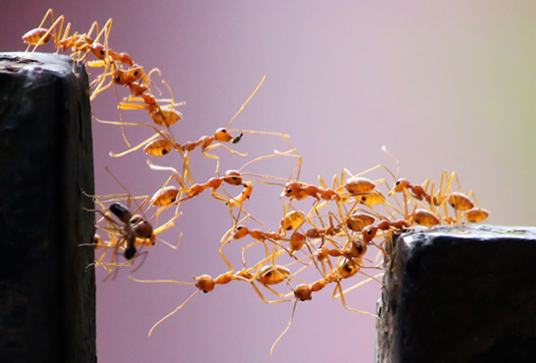 <small>Image by Vaishakh Manohar</small>
This section includes detailed instructions to make your own Idefics-2-MoE model. First, download .py files that implement the Idefics-2 Mixture-of-Expert Vision model:
pip install huggingface_hub
from huggingface_hub import HfApi, hf_hub_download
from tqdm.notebook import tqdm
import os
import shutil

# Repository details
repo_id = "lamm-mit/Cephalo-Idefics2-vision-3x8b-beta"
api = HfApi()

# List all files in the repository
files_in_repo = api.list_repo_files(repo_id)

# Filter for .py files
py_files = [file for file in files_in_repo if file.endswith('.py')]

# Directory to save the downloaded files
save_dir = "./Idefics2_MoE/"
os.makedirs(save_dir, exist_ok=True)

# Download each .py file
for file_name in tqdm(py_files):
    file_path = hf_hub_download(repo_id=repo_id, filename=file_name)
    new_path = os.path.join(save_dir, file_name)
    shutil.move(file_path, new_path)
    print(f"Downloaded: {file_name}")

print("Download completed.")
Second, we will download the models that will form the experts, as well as the base model. As a simple example, we use
One of them (or another model) must be used as base model, from which the vision model, connector, self-attention, etc. are used. From the list of models provided as experts, the feed forward layers are used. Each model will become one expert.
To transform an existing model into a Mixture of Experts (MoE) model, we first take the base model use a set of fine-tuned or otherwise trained models to create multiple expert models. Typically, each of the expert models specializes in different aspects of the input data, allowing for greater flexibility and efficiency in processing. To implement this, the original layers of the base model are replaced with modified layers that incorporate the gating and expert mechanisms. A custom configuration class is created to extend the base configuration, adding parameters specific to the MoE setup, such as the number of experts and the number of experts to select in each forward call ($k$).
Within the algorithm, the original MLP layers in the base model are replaced with a new MoE layer that combines the outputs of the selected experts. This MoE layer uses the gate scores to select the relevant experts' outputs and combines them into a single output by computing a weighted sum. The modified layers are then integrated back into the model, creating a hybrid architecture that retains the original model's structure but with enhanced capabilities.
from transformers import AutoProcessor, Idefics2ForConditionalGeneration , AutoTokenizer
from transformers import BitsAndBytesConfig
from Idefics2_MoE.moe_idefics2 import *

DEVICE='cuda'

model_id_1='lamm-mit/Cephalo-Idefics2-vision-3x8b-beta'

model_1 = Idefics2ForConditionalGeneration.from_pretrained( model_id_1,
                                                            torch_dtype=torch.bfloat16, #if your GPU allows
                                                            _attn_implementation="flash_attention_2", #make sure Flash Attention 2 is installed
                                                            trust_remote_code=True,
                                                          )
processor = AutoProcessor.from_pretrained(
    f"{model_id_1}",
    do_image_splitting=True
)

config =  AutoConfig.from_pretrained(model_id_1, trust_remote_code=True)

IDEFICS2_CHAT_TEMPLATE = "{% for message in messages %}{{message['role'].capitalize()}}{% if message['content'][0]['type'] == 'image' %}{{':'}}{% else %}{{': '}}{% endif %}{% for line in message['content'] %}{% if line['type'] == 'text' %}{{line['text']}}{% elif line['type'] == 'image' %}{{ '<image>' }}{% endif %}{% endfor %}<end_of_utterance>\n{% endfor %}{% if add_generation_prompt %}{{ 'Assistant:' }}{% endif %}"
processor.chat_template = IDEFICS2_CHAT_TEMPLATE
Now, load the rest of the models:
model_id_2='HuggingFaceM4/idefics2-8b-chatty'

model_2 = Idefics2ForConditionalGeneration.from_pretrained( model_id_2,
                                                            torch_dtype=torch.bfloat16, #if your GPU allows
                                                            _attn_implementation="flash_attention_2", #make sure Flash Attention 2 is installed
                                                            trust_remote_code=True,
                                                          )

model_id_3='HuggingFaceM4/idefics2-8b'

model_3 = Idefics2ForConditionalGeneration.from_pretrained( model_id_3,
                                                            torch_dtype=torch.bfloat16, #if your GPU allows
                                                            _attn_implementation="flash_attention_2", #make sure Flash Attention 2 is installed
                                                            trust_remote_code=True,
                                                          )
Put on device:
model_1.to(DEVICE)
model_2.to(DEVICE)
model_3.to(DEVICE)
Here we show how a MoE is constructed from the set of expert models loaded earlier. We consider three models, model_1, model_2 and model_3.
First, we designate the base model (here we use a deep copy of model_1) and the list of experts. We first create a config, then the moe_model. The config is based on the Idefics2 config from model_1, loaded above.
dtype = torch.bfloat16  # Desired dtype for new layers
base_model = copy.deepcopy(model_1)  # Your base model
expert_models = [ model_1,  model_2,  model_3 ]  # List of expert models

moe_config = Idefics2ForCausalLMMoEConfig(config=config, k=1, num_expert_models=len (expert_models))
moe_model = Idefics2ForCausalLMMoE(moe_config, base_model, expert_models,  layer_dtype = dtype)

count_parameters(expert_models[0]),count_parameters(moe_model)
Delete models no longer needed:
del model_1
del model_2
del model_3
Put MoE model on device:
moe_model.to(DEVICE)
Test if it works (untrained, may not produce desirable putput since gating layers have not been trained):
from transformers.image_utils import load_image

image = load_image("https://d2r55xnwy6nx47.cloudfront.net/uploads/2018/02/Ants_Lede1300.jpg")

# Create inputs
messages = [
    {
        "role": "user",
        "content": [
            {"type": "image"},
            {"type": "text", "text": "What is shown in this image, and what is the relevance for materials design? Include a discussion of multi-agent AI."},
        ]
    },
]
prompt = processor.apply_chat_template(messages, add_generation_prompt=True)

# Get inputs using the processor
inputs = processor(text=prompt, images=[image], return_tensors="pt")
inputs = {k: v.to(DEVICE) for k, v in inputs.items()}

# Generate
generated_ids = moe_model.generate(**inputs, max_new_tokens=500)
generated_texts = processor.batch_decode(generated_ids, skip_special_tokens=True)

print(generated_texts)
We train the gating layers by providing sample images/prompts for each of the three experts. Here is a simple example training set:
image_1 = Image.open("./Image_1.jpg")
image_1a =Image.open("./Image_1b.jpg")

image_2 = Image.open("./Image_2.jpg")
image_2a =Image.open("./Image_2b.jpg")

image_3 = Image.open("./Image_3.jpg")
image_3a =Image.open("./Image_3b.jpg")

prompts_per_expert = [
    [{"text": "User:<image>What is shown in this image. Explain the importance for materials design.<end_of_utterance>Assistant: The image shows", "image": [image_1]},
     {"text": "User:<image>What is shown in this image. Explain the importance for materials design.<end_of_utterance>Assistant: The image shows", "image": [image_1a]},
     ],

    [{"text": "User:<image>What is shown in this image. <end_of_utterance>Assistant: The image shows a human.", "image": [image_2]},
     {"text": "User:<image>What is shown in this image, and what does it mean in terms of human history? <end_of_utterance>Assistant: The image shows a historical image of human development.", "image": [image_2a]},
     ],

     [{"text": "User:<image>What is shown in this image. Provide a brief answer. <end_of_utterance>Assistant: This is an apple, a fruit with good flavor.", "image": [image_3]},
     {"text": "User:<image>What is shown in this image. Brief and concise answer. <end_of_utterance>Assistant: The image shows an apple.", "image": [image_3a]},
     ],
]

gating_layer_params = moe_model.train_gating_layer_params_from_hidden_states(processor,
                                              prompts_per_expert,
                                              epochs=1000, loss_steps=100,  lr=5e-5, )

# Set parameters for a specific layer
moe_model.set_gating_layer_params(gating_layer_params)

Now that the MoE model has been trained, we can try inference. Inference after MoE gating layers are trained:
from transformers.image_utils import load_image

image = load_image("https://d2r55xnwy6nx47.cloudfront.net/uploads/2018/02/Ants_Lede1300.jpg")

# Create inputs
messages = [
    {
        "role": "user",
        "content": [
            {"type": "image"},
            {"type": "text", "text": "What is shown in this image, and what is the relevance for materials design? Include a discussion of multi-agent AI."},
        ]
    },
]
prompt = processor.apply_chat_template(messages, add_generation_prompt=True)

# Get inputs using the processor
inputs = processor(text=prompt, images=[image], return_tensors="pt")
inputs = {k: v.to(DEVICE) for k, v in inputs.items()}

# Generate
generated_ids = moe_model.generate(**inputs, max_new_tokens=500)
generated_texts = processor.batch_decode(generated_ids, skip_special_tokens=True)

print(generated_texts[0])
We can save the MoE model either in Hugging Face Hub or locally:
repo_id='...'
moe_name='Cephalo-Idefics2-3x8b-beta'

processor.push_to_hub (f'{repo_id}/'+moe_name, )
moe_model.push_to_hub (f'{repo_id}/'+merged_name, )
Save locally:
processor.save_pretrained(moe_name, )
moe_model.save_pretrained(moe_name,  )
Loading the model works as done above. Here included again for completeness:
model_name_moe = f'{repo_id}/'+moe_name
config = AutoConfig.from_pretrained(model_name_moe, trust_remote_code=True)
processor = AutoProcessor.from_pretrained(model_name_moe, trust_remote_code=True)
moe_model = AutoModelForCausalLM.from_pretrained(
    model_name_moe,config=config,
    trust_remote_code=True,  torch_dtype=torch.bfloat16,
).to(device)

count_parameters(moe_model)
Please cite as:
@article{Buehler_Cephalo_2024,
  title={Cephalo: Multi-Modal Vision-Language Models for Bio-Inspired Materials Analysis and Design},
  author={Markus J. Buehler},
  journal={arXiv preprint arXiv:2405.19076},
  year={2024}
}