
Downloads · 30 days
20.9K
20% of all-time downloads
facebook/maskformer-swin-tiny-coco
maskformer-swin-tiny-coco is a image segmentation model from facebook. Use it for the image segmentation task on the model card, and read the license before you ship it in a product. It is set up for transformers. The card lists the license as other.
MaskFormer model trained on COCO panoptic segmentation (tiny-sized version, Swin backbone). It was introduced in the paper Per-Pixel Classification is Not All You Need for Semantic Segmentation and first released in t…
Downloads · 30 days
20.9K
20% of all-time downloads
All-time downloads
105K
Public
Parameters
41.8M
670 MB on disk
Likes
7
Public
Click a slice to open those files.
.bin167 MB · 50%
How the weights are stored.
F3241.8M · 100%
From the Hugging Face model README
MaskFormer model trained on COCO panoptic segmentation (tiny-sized version, Swin backbone). It was introduced in the paper Per-Pixel Classification is Not All You Need for Semantic Segmentation and first released in this repository.
Disclaimer: The team releasing MaskFormer did not write a model card for this model so this model card has been written by the Hugging Face team.
MaskFormer addresses instance, semantic and panoptic segmentation with the same paradigm: by predicting a set of masks and corresponding labels. Hence, all 3 tasks are treated as if they were instance segmentation.
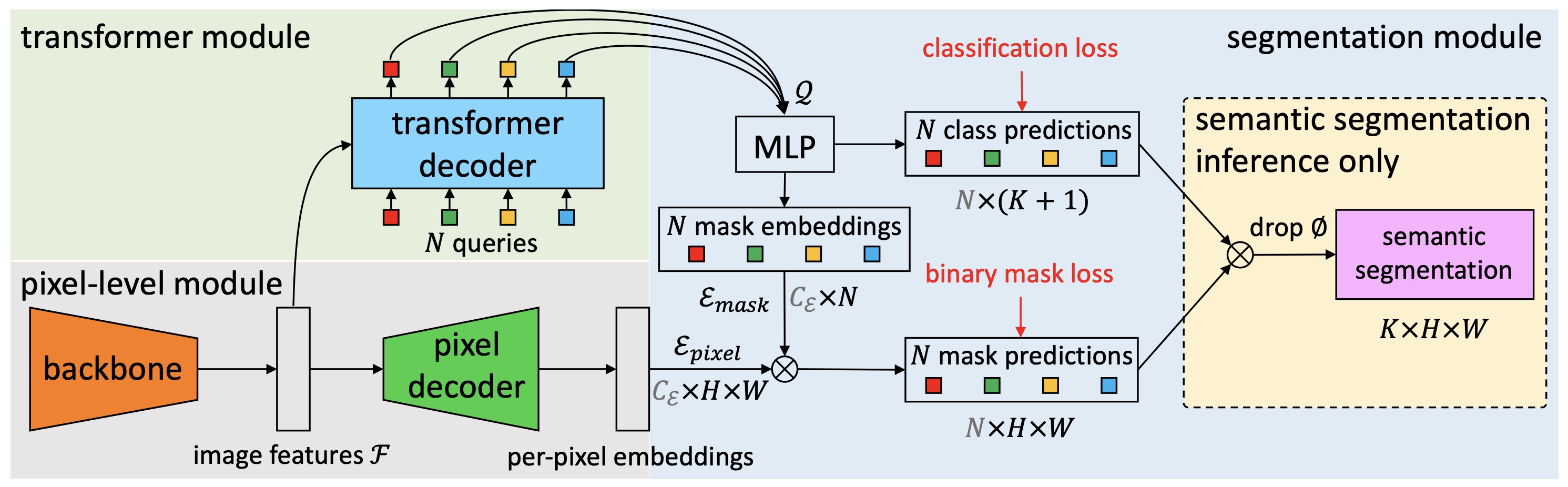
You can use this particular checkpoint for semantic segmentation. See the model hub to look for other fine-tuned versions on a task that interests you.
Here is how to use this model:
from transformers import MaskFormerFeatureExtractor, MaskFormerForInstanceSegmentation
from PIL import Image
import requests

# load MaskFormer fine-tuned on COCO panoptic segmentation
feature_extractor = MaskFormerFeatureExtractor.from_pretrained("facebook/maskformer-swin-tiny-coco")
model = MaskFormerForInstanceSegmentation.from_pretrained("facebook/maskformer-swin-tiny-coco")

url = "http://images.cocodataset.org/val2017/000000039769.jpg"
image = Image.open(requests.get(url, stream=True).raw)
inputs = feature_extractor(images=image, return_tensors="pt")

outputs = model(**inputs)
# model predicts class_queries_logits of shape `(batch_size, num_queries)`
# and masks_queries_logits of shape `(batch_size, num_queries, height, width)`
class_queries_logits = outputs.class_queries_logits
masks_queries_logits = outputs.masks_queries_logits

# you can pass them to feature_extractor for postprocessing
result = feature_extractor.post_process_panoptic_segmentation(outputs, target_sizes=[image.size[::-1]])[0]
# we refer to the demo notebooks for visualization (see "Resources" section in the MaskFormer docs)
predicted_panoptic_map = result["segmentation"]
For more code examples, we refer to the documentation.