
Downloads · 30 days
0
ai-forever/Kandinsky3.0
Kandinsky3.0 is a machine learning model from ai-forever. Use it for the machine learning task on the model card, and read the license before you ship it in a product. The card lists the license as apache-2.0.
Downloads · 30 days
0
Access
Public
Updated Nov 22, 2023
Repo size
25.6 GB
Likes
23
Public
Click a slice to open those files.
.pt25.5 GB · 100%
From the Hugging Face model README

Post | Generate | Telegram-bot | [Report]
Kandinsky 3.0 is an open-source text-to-image diffusion model built upon the Kandinsky2-x model family. In comparison to its predecessors, Kandinsky 3.0 incorporates more data and specifically related to Russian culture, which allows to generate pictures related to Russin culture. Furthermore, enhancements have been made to the text understanding and visual quality of the model, achieved by increasing the size of the text encoder and Diffusion U-Net models, respectively.
For more information: details of training, example of generations check out our post. The english version will be released in a couple of days.
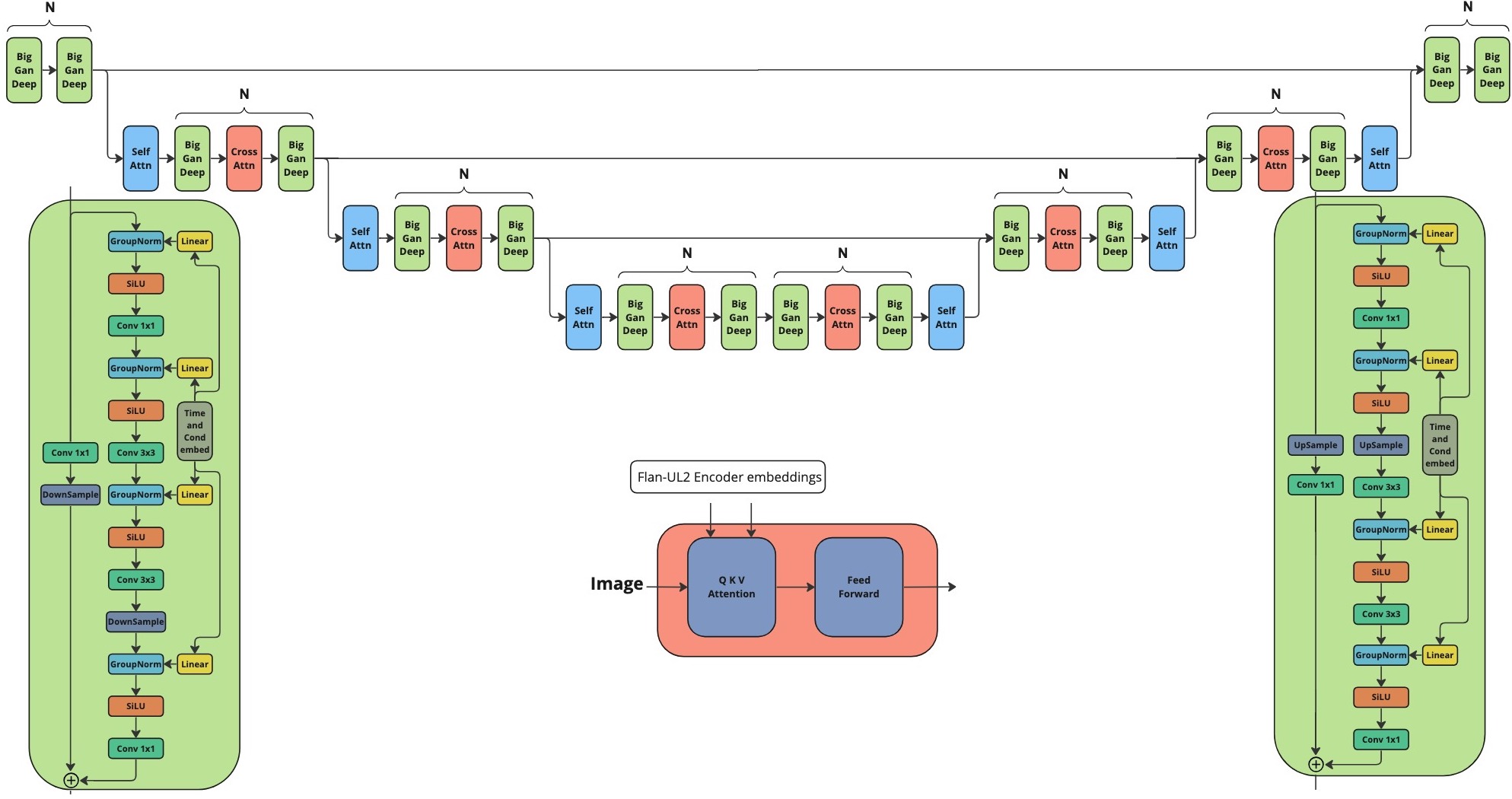
Architecture consists of three parts:
We release our two models:
Weights of the model are loaded internally but if want to change them one can use the following example:
from huggingface_hub import hf_hub_download
from kandinsky3 import get_T2I_unet, get_T5encoder, get_movq, Kandinsky3T2IPipeline

unet_path = hf_hub_download(
        repo_id="ai-forever/Kandinsky3.0", filename='weights/kandinsky3.pt')
)

movq_path = hf_hub_download(
          repo_id="ai-forever/Kandinsky3.0", filename='weights/movq.pt')
)
unet, null_embedding, projections_state_dict = get_T2I_unet(device, unet_path, fp16=fp16)
processor, condition_encoders = get_T5encoder(device, text_encode_path, projections_state_dict, fp16=fp16)
movq = get_movq(device, movq_path, fp16=fp16)
t2i_pipe =  Kandinsky3T2IPipeline(device, unet, null_embedding, processor, condition_encoders, movq, fp16=fp16)
from huggingface_hub import hf_hub_download
from kandinsky3 import get_inpainting_unet, get_T5encoder, get_movq, Kandinsky3InpaintingPipeline

inpainting_unet_path = hf_hub_download(
          repo_id="ai-forever/Kandinsky3.0", filename='weights/kandinsky3_inpainting.pt', cache_dir=cache_dir
)
movq_path = hf_hub_download(
          repo_id="ai-forever/Kandinsky3.0", filename='weights/movq.pt')
)

unet, null_embedding, projections_state_dict = get_inpainting_unet(device, unet_path, fp16=fp16)
processor, condition_encoders = get_T5encoder(device, text_encode_path, projections_state_dict, fp16=fp16)
movq = get_movq(device, movq_path, fp16=False) #MoVQ ooesn't work properly in fp16 on inpainting
pipe = Kandinsky3InpaintingPipeline(device, unet, null_embedding, processor, condition_encoders, movq, fp16=fp16)
To install repo first one need to create conda environment:
conda create -n kandinsky -y python=3.8;
source activate kandinsky;
pip install torch==1.10.1+cu111 torchvision==0.11.2+cu111 torchaudio==0.10.1 -f https://download.pytorch.org/whl/cu113/torch_stable.html;
pip install -r requirements.txt;
The exact dependencies is got using pip freeze and can be found in exact_requirements.txt
Check our jupyter notebooks with examples in ./examples folder
from kandinsky3 import get_T2I_pipeline

t2i_pipe = get_T2I_pipeline('cuda', fp16=True)

image = t2i_pipe( "A cute corgi lives in a house made out of sushi.")
from kandinsky3 import get_inpainting_pipeline

inp_pipe = get_inpainting_pipeline('cuda', fp16=True)

image = ... # PIL Image
mask = ... # Numpy array (HxW). Set 1 where image should be masked
image = inp_pipe( "A cute corgi lives in a house made out of sushi.", image, mask)