Downloads · 30 days
7
18% of all-time downloads
Startupbootcamp/Llama-2-7b-chat-ct2-int8
Llama-2-7b-chat-ct2-int8 is a machine learning model from Startupbootcamp. Use it for the machine learning task on the model card, and read the license before you ship it in a product. It is set up for transformers.
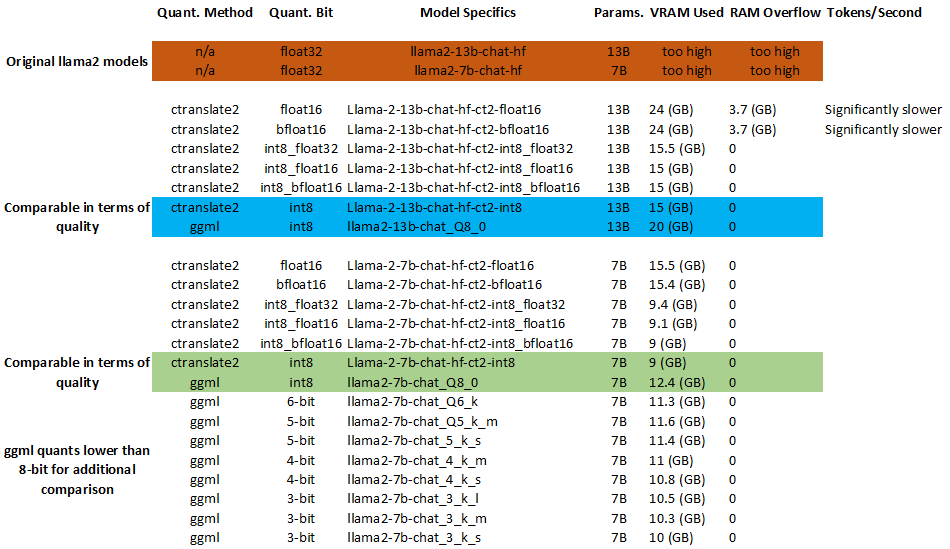
"Ctranslate2" is an amazing library that runs these models. They are faster, more accurate, and use less VRAM/RAM than GGML and GPTQ models.
Downloads · 30 days
7
18% of all-time downloads
All-time downloads
38
Public
Repo size
6.7 GB
Likes
0
Public
Click a slice to open those files.
.bin6.7 GB · 100%
From the Hugging Face model README
"Ctranslate2" is an amazing library that runs these models. They are faster, more accurate, and use less VRAM/RAM than GGML and GPTQ models.
How to run with instructions: https://github.com/BBC-Esq
Learn more about the amazing "ctranslate2" technology:"
<details> <summary><b>Compatibility and Data Formats</b></summary>| Format | Approximate Size Compared to float32 | Nvidia GPU Required "Compute" | Accuracy Summary |
|---|---|---|---|
float32 | 100% | 1.0 | Offers more precision and a wider range. Most un-quantized models use this. |
int16 | 51.37% | 1.0 | Same as int8 but with a larger range. |
float16 | 50.00% | 5.3 (e.g. Nvidia 10 Series and Higher) | Suitable for scientific computations; balance between precision and memory. |
bfloat16 | 50.00% | 8.0 (e.g. Nvidia 30 Series and Higher) | Often used in neural network training; larger exponent range than float16. |
int8_float32 | 27.47% | test manually (see below) | Combines low precision integer with high precision float. Useful for mixed data. |
int8_float16 | 26.10% | test manually (see below) | Combines low precision integer with medium precision float. Saves memory. |
int8_bfloat16 | 26.10% | test manually (see below) | Combines low precision integer with reduced precision float. Efficient for neural nets. |
int8 | 25% | 1.0 | Lower precision, suitable for whole numbers within a specific range. Often used where memory is crucial. |
| Web Link | Description |
|---|---|
| CUDA GPUs Supported | See what level of "compute" your Nvidia GPU supports. |
| CTranslate2 Quantization | Even if your GPU/CPU doesn't support the data type of the model you download, "ctranslate2" will automatically run the model in a way that's compatible. |
| Bfloat16 Floating-Point Format | Visualize data formats. |
| Nvidia Floating-Point | Technical discussion. |
pip install ctranslate2
python
import ctranslate2
Check GPU/CUDA compatibility:
ctranslate2.get_supported_compute_types("cuda")
Check CPU compatibility:
ctranslate2.get_supported_compute_types("cpu")
It will print out your CPU/GPU compatibility. For example, a system with a 4090 GPU and 13900k would have the following compatibility:
| CPU | GPU | |
|---|---|---|
float32 | ✅ | ✅ |
int16 | ✅ | |
float16 | ✅ | |
bfloat16 | ✅ | |
int8_float32 | ✅ | ✅ |
int8_float16 | ✅ | |
int8_bfloat16 | ✅ | |
int8 | ✅ | ✅ |