
Downloads · 30 days
4K
12% of all-time downloads
ShermanG/ControlNet-Standard-Lineart-for-SDXL
ControlNet-Standard-Lineart-for-SDXL is a machine learning model from ShermanG. Use it for the machine learning task on the model card, and read the license before you ship it in a product. It is set up for diffusers.
SDXL has perfect content generation functions and amazing LoRa performance, but its ControlNet is always its drawback, filtering out most of the users. Based on the computational power constraints of personal GPU, one…
Downloads · 30 days
4K
12% of all-time downloads
All-time downloads
33K
Public
Parameters
1.3B
5 GB on disk
Likes
10
Public
Click a slice to open those files.
.safetensors5 GB · 100%
From the Hugging Face model README
SDXL has perfect content generation functions and amazing LoRa performance, but its ControlNet is always its drawback, filtering out most of the users. Based on the computational power constraints of personal GPU, one cannot easily train and tune a perfect ControlNet model.
This model attempts to fill the insufficiency of the ControlNet for SDXL to lower the requirements for SDXL to personal users.
The training script used is from official Diffuser library.
The environment setup guide can be found by the official Diffuser guide.
Usage example:
from diffusers import StableDiffusionXLControlNetPipeline, ControlNetModel, AutoencoderKL
from diffusers.utils import load_image
import numpy as  np
import  torch
from  PIL  import  Image

controlnet_conditioning_scale = 0.9
controlnet = ControlNetModel.from_pretrained(
"path/to/this/directory", torch_dtype=torch.float16
)
vae = AutoencoderKL.from_pretrained("madebyollin/sdxl-vae-fp16-fix", torch_dtype=torch.float16)

pipe = StableDiffusionXLControlNetPipeline.from_pretrained(
"stabilityai/stable-diffusion-xl-base-1.0", controlnet=controlnet, vae=vae, torch_dtype=torch.float16
)
pipe.enable_model_cpu_offload()

prompt = "Your prompt"
negative_prompt = "Your negative prompt"
line = Image.open("path/to/your/controling/image")

image = pipe(
	prompt,
	controlnet_conditioning_scale=controlnet_conditioning_scale,
	image=line
).images[0]
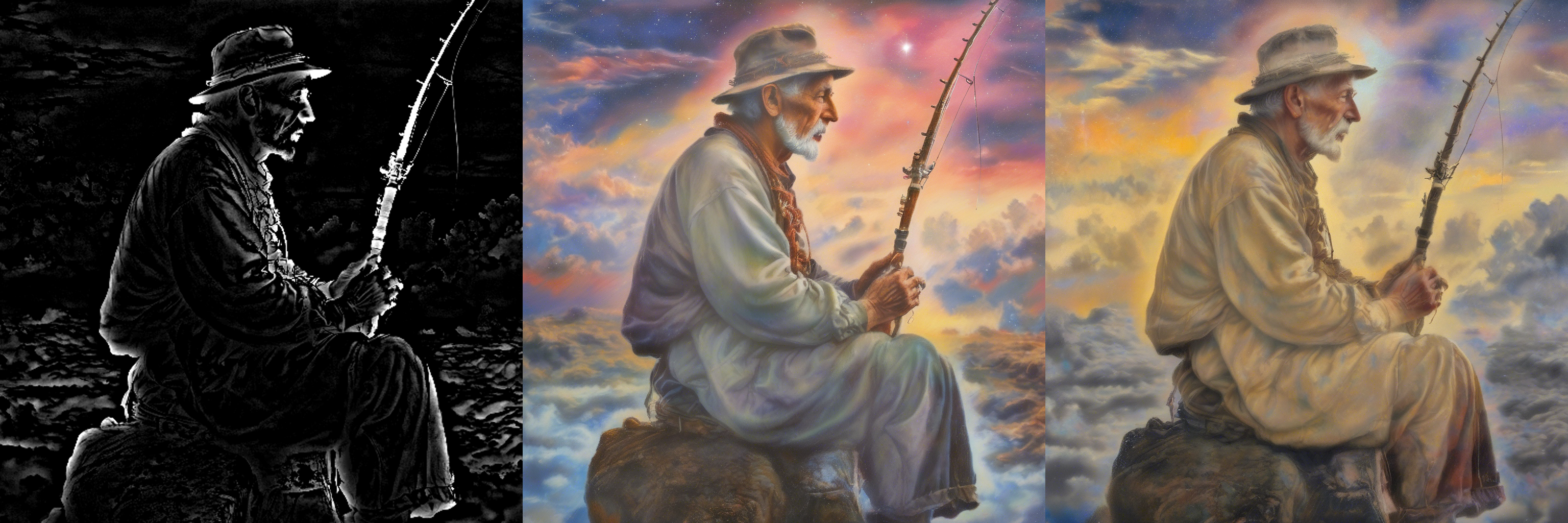
Compared to simple line interpretation, this model can understand depth relation as shown below:



Loading custom datasets through HuggingFace needs to modify the script to realize full automation. In the train_controlnet_sdxl.py, we need to modify line 650 to:
 if  args.train_data_dir is  not  None:
	dataset = load_dataset(
	args.train_data_dir,
	cache_dir=args.cache_dir,
	trust_remote_code=True,
	)
As for the dataset, we need to organize the structure as demonstrated in the dataset_example, and change the script to:
--train_data_dir="/path/to/your/dataset_example"
Based on the experiment, sometimes this ControlNet cannot understand colorization very well on the xl-base-1.0. However, it can capture the line perfectly. So I suspect the miss colorization happened on the base model I chose. More experiments are needed.