
Downloads · 30 days
107
8% of all-time downloads
RedHatAI/Qwen3-Coder-480B-A35B-Instruct-FP8
Qwen3-Coder-480B-A35B-Instruct-FP8 is a text generation model from RedHatAI. Use it when you need the model to write or continue text. The card lists the license as apache-2.0.
<h1 style="display: flex; align-items: center; gap: 10px; margin: 0;" Qwen3-Coder-480B-A35B-Instruct-FP8 <img src="https://www.redhat.com/rhdc/managed-files/Catalog-Validatedmodel0.png" alt="Model Icon" width="40" sty…
Downloads · 30 days
107
8% of all-time downloads
All-time downloads
1.4K
Public
Parameters
480B
482 GB on disk
Likes
3
Public
Click a slice to open those files.
.safetensors482 GB · 100%
How the weights are stored.
F8_E4M3478B · 100%
From the Hugging Face model README
Today, we're announcing Qwen3-Coder, our most agentic code model to date. Qwen3-Coder is available in multiple sizes, but we're excited to introduce its most powerful variant first: Qwen3-Coder-480B-A35B-Instruct. featuring the following key enhancements:
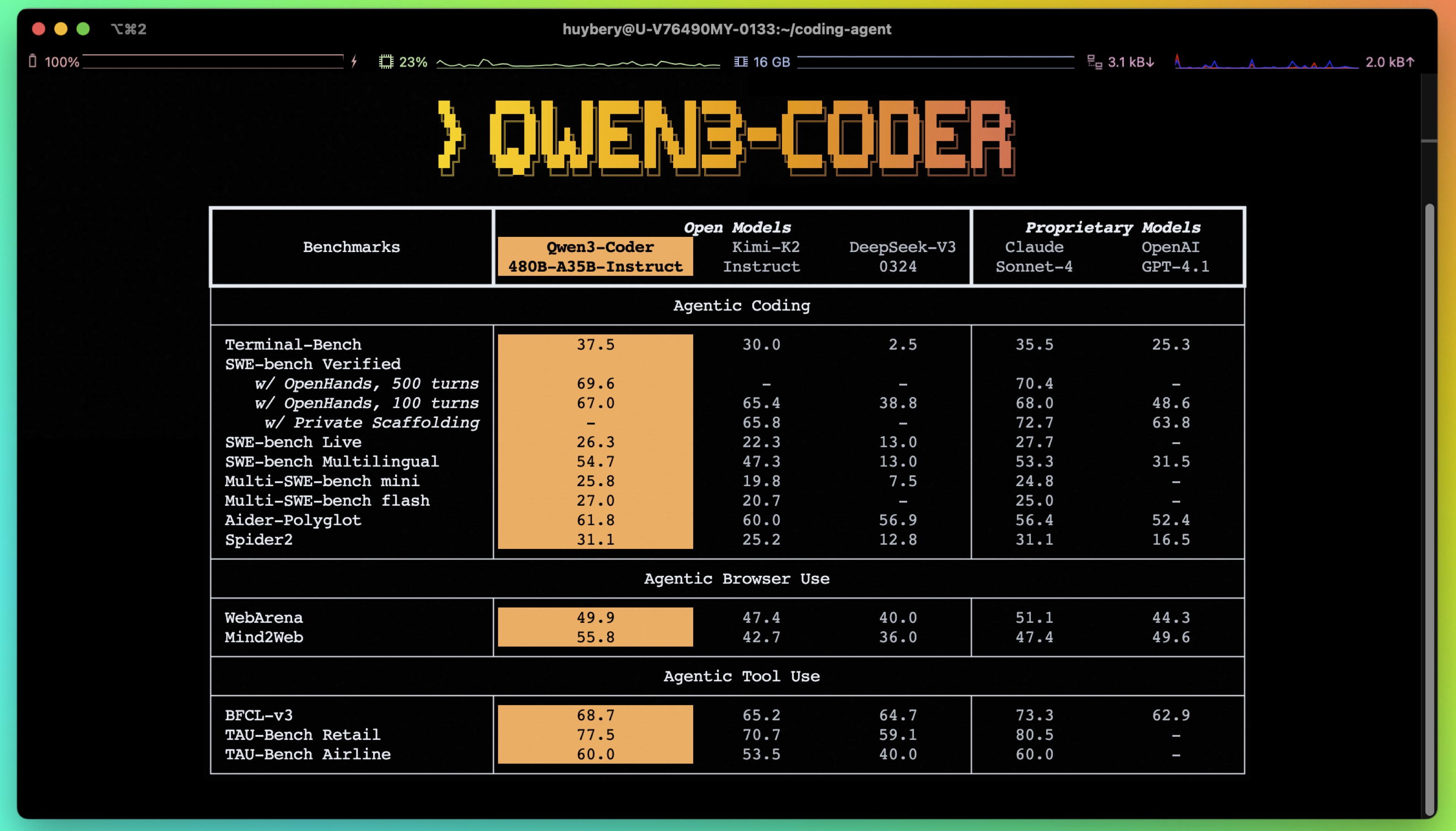
Qwen3-480B-A35B-Instruct has the following features:
NOTE: This model supports only non-thinking mode and does not generate <think></think> blocks in its output. Meanwhile, specifying enable_thinking=False is no longer required.
For more details, including benchmark evaluation, hardware requirements, and inference performance, please refer to our blog, GitHub, and Documentation.
We advise you to use the latest version of transformers.
With transformers<4.51.0, you will encounter the following error:
KeyError: 'qwen3_moe'
The following contains a code snippet illustrating how to use the model generate content based on given inputs.
from transformers import AutoModelForCausalLM, AutoTokenizer

model_name = "Qwen/Qwen3-480B-A35B-Instruct"

# load the tokenizer and the model
tokenizer = AutoTokenizer.from_pretrained(model_name)
model = AutoModelForCausalLM.from_pretrained(
    model_name,
    torch_dtype="auto",
    device_map="auto"
)

# prepare the model input
prompt = "Write a quick sort algorithm."
messages = [
    {"role": "user", "content": prompt}
]
text = tokenizer.apply_chat_template(
    messages,
    tokenize=False,
    add_generation_prompt=True,
)
model_inputs = tokenizer([text], return_tensors="pt").to(model.device)

# conduct text completion
generated_ids = model.generate(
    **model_inputs,
    max_new_tokens=65536
)
output_ids = generated_ids[0][len(model_inputs.input_ids[0]):].tolist()

content = tokenizer.decode(output_ids, skip_special_tokens=True)

print("content:", content)
Note: If you encounter out-of-memory (OOM) issues, consider reducing the context length to a shorter value, such as 32,768.
This model can be deployed efficiently using the vLLM backend, as shown in the example below.
from vllm import LLM, SamplingParams
from transformers import AutoTokenizer
model_id = "RedHatAI/Qwen3-Coder-480B-A35B-Instruct-FP8"
number_gpus = 8
sampling_params = SamplingParams(temperature=0.6, top_p=0.95, max_tokens=1024)
tokenizer = AutoTokenizer.from_pretrained(model_id)
prompt = "Give me a short introduction to large language model."
llm = LLM(model=model_id, tensor_parallel_size=number_gpus)
outputs = llm.generate(prompt, sampling_params)
generated_text = outputs[0].outputs[0].text
print(generated_text)
vLLM also supports OpenAI-compatible serving. See the documentation for more details.
<details> <summary>Deploy on <strong>Red Hat AI Inference Server</strong></summary>podman run --rm -it --device nvidia.com/gpu=all -p 8000:8000 \
--ipc=host \
--env "HUGGING_FACE_HUB_TOKEN=$HF_TOKEN" \
--env "HF_HUB_OFFLINE=0" -v ~/.cache/vllm:/home/vllm/.cache \
--name=vllm \
registry.access.redhat.com/rhaiis/rh-vllm-cuda \
vllm serve \
--tensor-parallel-size 8 \
--max-model-len 32768 \
--enforce-eager --model RedHatAI/Qwen3-Coder-480B-A35B-Instruct-FP8
# Setting up vllm server with ServingRuntime
# Save as: vllm-servingruntime.yaml
apiVersion: serving.kserve.io/v1alpha1
kind: ServingRuntime
metadata:
 name: vllm-cuda-runtime # OPTIONAL CHANGE: set a unique name
 annotations:
   openshift.io/display-name: vLLM NVIDIA GPU ServingRuntime for KServe
   opendatahub.io/recommended-accelerators: '["nvidia.com/gpu"]'
 labels:
   opendatahub.io/dashboard: 'true'
spec:
 annotations:
   prometheus.io/port: '8080'
   prometheus.io/path: '/metrics'
 multiModel: false
 supportedModelFormats:
   - autoSelect: true
     name: vLLM
 containers:
   - name: kserve-container
     image: quay.io/modh/vllm:rhoai-2.25-cuda # CHANGE if needed. If AMD: quay.io/modh/vllm:rhoai-2.25-rocm
     command:
       - python
       - -m
       - vllm.entrypoints.openai.api_server
     args:
       - "--port=8080"
       - "--model=/mnt/models"
       - "--served-model-name={{.Name}}"
     env:
       - name: HF_HOME
         value: /tmp/hf_home
     ports:
       - containerPort: 8080
         protocol: TCP
# Attach model to vllm server. This is an NVIDIA template
# Save as: inferenceservice.yaml
apiVersion: serving.kserve.io/v1beta1
kind: InferenceService
metadata:
  annotations:
    openshift.io/display-name: Qwen3-Coder-480B-A35B-Instruct-FP8 # OPTIONAL CHANGE
    serving.kserve.io/deploymentMode: RawDeployment
  name: Qwen3-Coder-480B-A35B-Instruct-FP8          # specify model name. This value will be used to invoke the model in the payload
  labels:
    opendatahub.io/dashboard: 'true'
spec:
  predictor:
    maxReplicas: 1
    minReplicas: 1
    model:
      modelFormat:
        name: vLLM
      name: ''
      resources:
        limits:
          cpu: '2'			# this is model specific
          memory: 8Gi		# this is model specific
          nvidia.com/gpu: '1'	# this is accelerator specific
        requests:			# same comment for this block
          cpu: '1'
          memory: 4Gi
          nvidia.com/gpu: '1'
      runtime: vllm-cuda-runtime	# must match the ServingRuntime name above
      storageUri: oci://registry.redhat.io/rhelai1/modelcar-qwen3-coder-480b-a35b-instruct-fp8:1.5
    tolerations:
    - effect: NoSchedule
      key: nvidia.com/gpu
      operator: Exists
# make sure first to be in the project where you want to deploy the model
# oc project <project-name>

# apply both resources to run model

# Apply the ServingRuntime
oc apply -f vllm-servingruntime.yaml
# Replace <inference-service-name> and <cluster-ingress-domain> below:
# - Run `oc get inferenceservice` to find your URL if unsure.

# Call the server using curl:
curl https://<inference-service-name>-predictor-default.<domain>/v1/chat/completions
        -H "Content-Type: application/json" \
        -d '{
    "model": "Qwen3-Coder-480B-A35B-Instruct-FP8",
    "stream": true,
    "stream_options": {
        "include_usage": true
    },
    "max_tokens": 1,
    "messages": [
        {
            "role": "user",
            "content": "How can a bee fly when its wings are so small?"
        }
    ]
}'
See Red Hat Openshift AI documentation for more details.
</details>For convenience and performance, we have provided fp8-quantized model checkpoint for Qwen3, whose name ends with -FP8. The quantization method is fine-grained fp8 quantization with block size of 128. You can find more details in the quantization_config field in config.json.
You can use the Qwen3-480B-A35B-Instruct-FP8 model with serveral inference frameworks, including transformers, sglang, and vllm, as the original bfloat16 model.
However, please pay attention to the following known issues:
transformers:
transformers for distributed inference. You may need to set the environment variable CUDA_LAUNCH_BLOCKING=1 if multiple devices are used in inference.Qwen3-Coder excels in tool calling capabilities.
You can simply define or use any tools as following example.
# Your tool implementation
def square_the_number(num: float) -> dict:
    return num ** 2

# Define Tools
tools=[
    {
        "type":"function",
        "function":{
            "name": "square_the_number",
            "description": "output the square of the number.",
            "parameters": {
                "type": "object",
                "required": ["input_num"],
                "properties": {
                    'input_num': {
                        'type': 'number',
                        'description': 'input_num is a number that will be squared'
                        }
                },
            }
        }
    }
]

import OpenAI
# Define LLM
client = OpenAI(
    # Use a custom endpoint compatible with OpenAI API
    base_url='http://localhost:8000/v1',  # api_base
    api_key="EMPTY"
)

messages = [{'role': 'user', 'content': 'square the number 1024'}]

completion = client.chat.completions.create(
    messages=messages,
    model="Qwen3-Coder-480B-A35B-Instruct",
    max_tokens=65536,
    tools=tools,
)

print(completion.choice[0])
To achieve optimal performance, we recommend the following settings:
Sampling Parameters:
temperature=0.7, top_p=0.8, top_k=20, repetition_penalty=1.05.Adequate Output Length: We recommend using an output length of 65,536 tokens for most queries, which is adequate for instruct models.
If you find our work helpful, feel free to give us a cite.
@misc{qwen3technicalreport,
      title={Qwen3 Technical Report},
      author={Qwen Team},
      year={2025},
      eprint={2505.09388},
      archivePrefix={arXiv},
      primaryClass={cs.CL},
      url={https://arxiv.org/abs/2505.09388},
}