
Downloads · 30 days
139
2% of all-time downloads
LiteLLMs/Llama3-OpenBioLLM-8B-GGUF
Llama3-OpenBioLLM-8B-GGUF is a machine learning model from LiteLLMs. Use it for the machine learning task on the model card, and read the license before you ship it in a product. The card lists the license as llama3.
Downloads · 30 days
139
2% of all-time downloads
All-time downloads
5.7K
Public
Repo size
72.7 GB
Likes
1
Public
Click a slice to open those files.
.gguf72.7 GB · 100%
From the Hugging Face model README
This repo contains GGUF format model files for Llama3-OpenBioLLM-8B.
<!-- description end --> <!-- README_GGUF.md-about-gguf start -->GGUF is a new format introduced by the llama.cpp team on August 21st 2023. It is a replacement for GGML, which is no longer supported by llama.cpp. Here is an incomplete list of clients and libraries that are known to support GGUF:
Note for manual downloaders: You almost never want to clone the entire repo! Multiple different quantisation formats are provided, and most users only want to pick and download a single folder.
The following clients/libraries will automatically download models for you, providing a list of available models to choose from:
text-generation-webuiUnder Download Model, you can enter the model repo: LiteLLMs/Llama3-OpenBioLLM-8B-GGUF and below it, a specific filename to download, such as: Q4_0/Q4_0-00001-of-00009.gguf.
Then click Download.
I recommend using the huggingface-hub Python library:
pip3 install huggingface-hub
Then you can download any individual model file to the current directory, at high speed, with a command like this:
huggingface-cli download LiteLLMs/Llama3-OpenBioLLM-8B-GGUF Q4_0/Q4_0-00001-of-00009.gguf --local-dir . --local-dir-use-symlinks False
You can also download multiple files at once with a pattern:
huggingface-cli download LiteLLMs/Llama3-OpenBioLLM-8B-GGUF --local-dir . --local-dir-use-symlinks False --include='*Q4_K*gguf'
For more documentation on downloading with huggingface-cli, please see: HF -> Hub Python Library -> Download files -> Download from the CLI.
To accelerate downloads on fast connections (1Gbit/s or higher), install hf_transfer:
pip3 install huggingface_hub[hf_transfer]
And set environment variable HF_HUB_ENABLE_HF_TRANSFER to 1:
HF_HUB_ENABLE_HF_TRANSFER=1 huggingface-cli download LiteLLMs/Llama3-OpenBioLLM-8B-GGUF Q4_0/Q4_0-00001-of-00009.gguf --local-dir . --local-dir-use-symlinks False
Windows Command Line users: You can set the environment variable by running set HF_HUB_ENABLE_HF_TRANSFER=1 before the download command.
Make sure you are using llama.cpp from commit d0cee0d or later.
./main -ngl 35 -m Q4_0/Q4_0-00001-of-00009.gguf --color -c 8192 --temp 0.7 --repeat_penalty 1.1 -n -1 -p "<PROMPT>"
Change -ngl 32 to the number of layers to offload to GPU. Remove it if you don't have GPU acceleration.
Change -c 8192 to the desired sequence length. For extended sequence models - eg 8K, 16K, 32K - the necessary RoPE scaling parameters are read from the GGUF file and set by llama.cpp automatically. Note that longer sequence lengths require much more resources, so you may need to reduce this value.
If you want to have a chat-style conversation, replace the -p <PROMPT> argument with -i -ins
For other parameters and how to use them, please refer to the llama.cpp documentation
text-generation-webuiFurther instructions can be found in the text-generation-webui documentation, here: text-generation-webui/docs/04 ‐ Model Tab.md.
You can use GGUF models from Python using the llama-cpp-python or ctransformers libraries. Note that at the time of writing (Nov 27th 2023), ctransformers has not been updated for some time and is not compatible with some recent models. Therefore I recommend you use llama-cpp-python.
For full documentation, please see: llama-cpp-python docs.
Run one of the following commands, according to your system:
# Base ctransformers with no GPU acceleration
pip install llama-cpp-python
# With NVidia CUDA acceleration
CMAKE_ARGS="-DLLAMA_CUBLAS=on" pip install llama-cpp-python
# Or with OpenBLAS acceleration
CMAKE_ARGS="-DLLAMA_BLAS=ON -DLLAMA_BLAS_VENDOR=OpenBLAS" pip install llama-cpp-python
# Or with CLBLast acceleration
CMAKE_ARGS="-DLLAMA_CLBLAST=on" pip install llama-cpp-python
# Or with AMD ROCm GPU acceleration (Linux only)
CMAKE_ARGS="-DLLAMA_HIPBLAS=on" pip install llama-cpp-python
# Or with Metal GPU acceleration for macOS systems only
CMAKE_ARGS="-DLLAMA_METAL=on" pip install llama-cpp-python
# In windows, to set the variables CMAKE_ARGS in PowerShell, follow this format; eg for NVidia CUDA:
$env:CMAKE_ARGS = "-DLLAMA_OPENBLAS=on"
pip install llama-cpp-python
from llama_cpp import Llama
# Set gpu_layers to the number of layers to offload to GPU. Set to 0 if no GPU acceleration is available on your system.
llm = Llama(
  model_path="./Q4_0/Q4_0-00001-of-00009.gguf",  # Download the model file first
  n_ctx=32768,  # The max sequence length to use - note that longer sequence lengths require much more resources
  n_threads=8,            # The number of CPU threads to use, tailor to your system and the resulting performance
  n_gpu_layers=35         # The number of layers to offload to GPU, if you have GPU acceleration available
)
# Simple inference example
output = llm(
  "<PROMPT>", # Prompt
  max_tokens=512,  # Generate up to 512 tokens
  stop=["</s>"],   # Example stop token - not necessarily correct for this specific model! Please check before using.
  echo=True        # Whether to echo the prompt
)
# Chat Completion API
llm = Llama(model_path="./Q4_0/Q4_0-00001-of-00009.gguf", chat_format="llama-2")  # Set chat_format according to the model you are using
llm.create_chat_completion(
    messages = [
        {"role": "system", "content": "You are a story writing assistant."},
        {
            "role": "user",
            "content": "Write a story about llamas."
        }
    ]
)
Here are guides on using llama-cpp-python and ctransformers with LangChain:
<!-- README_GGUF.md-how-to-run end --> <!-- footer end --> <!-- original-model-card start -->

Introducing OpenBioLLM-8B: A State-of-the-Art Open Source Biomedical Large Language Model
OpenBioLLM-8B is an advanced open source language model designed specifically for the biomedical domain. Developed by Saama AI Labs, this model leverages cutting-edge techniques to achieve state-of-the-art performance on a wide range of biomedical tasks.
🏥 Biomedical Specialization: OpenBioLLM-8B is tailored for the unique language and knowledge requirements of the medical and life sciences fields. It was fine-tuned on a vast corpus of high-quality biomedical data, enabling it to understand and generate text with domain-specific accuracy and fluency.
🎓 Superior Performance: With 8 billion parameters, OpenBioLLM-8B outperforms other open source biomedical language models of similar scale. It has also demonstrated better results compared to larger proprietary & open-source models like GPT-3.5 and Meditron-70B on biomedical benchmarks.
🧠 Advanced Training Techniques: OpenBioLLM-8B builds upon the powerful foundations of the Meta-Llama-3-8B and Meta-Llama-3-8B models. It incorporates the DPO dataset and fine-tuning recipe along with a custom diverse medical instruction dataset. Key components of the training pipeline include:
<div align="center"> <img width="1200px" src="https://cdn-uploads.huggingface.co/production/uploads/5f3fe13d79c1ba4c353d0c19/oPchsJsEpQoGcGXVbh7YS.png"> </div>This combination of cutting-edge techniques enables OpenBioLLM-8B to align with key capabilities and preferences for biomedical applications.
⚙️ Release Details:
The model can be fine-tuned for more specialized tasks and datasets as needed.
OpenBioLLM-8B represents an important step forward in democratizing advanced language AI for the biomedical community. By leveraging state-of-the-art architectures and training techniques from leading open source efforts like Llama-3, we have created a powerful tool to accelerate innovation and discovery in healthcare and the life sciences.
We are excited to share OpenBioLLM-8B with researchers and developers around the world.
Important: Please use the exact chat template provided by Llama-3 instruct version. Otherwise there will be a degradation in the performance. The model output can be verbose in rare cases. Please consider setting temperature = 0 to make this happen less.
See the snippet below for usage with Transformers:
import transformers
import torch

model_id = "aaditya/OpenBioLLM-Llama3-8B"

pipeline = transformers.pipeline(
    "text-generation",
    model=model_id,
    model_kwargs={"torch_dtype": torch.bfloat16},
    device="auto",
)

messages = [
    {"role": "system", "content": "You are an expert and experienced from the healthcare and biomedical domain with extensive medical knowledge and practical experience. Your name is OpenBioLLM, and you were developed by Saama AI Labs. who's willing to help answer the user's query with explanation. In your explanation, leverage your deep medical expertise such as relevant anatomical structures, physiological processes, diagnostic criteria, treatment guidelines, or other pertinent medical concepts. Use precise medical terminology while still aiming to make the explanation clear and accessible to a general audience."},
    {"role": "user", "content": "How can i split a 3mg or 4mg waefin pill so i can get a 2.5mg pill?"},
]

prompt = pipeline.tokenizer.apply_chat_template(
		messages,
		tokenize=False,
		add_generation_prompt=True
)

terminators = [
    pipeline.tokenizer.eos_token_id,
    pipeline.tokenizer.convert_tokens_to_ids("<|eot_id|>")
]

outputs = pipeline(
    prompt,
    max_new_tokens=256,
    eos_token_id=terminators,
    do_sample=True,
    temperature=0.0,
    top_p=0.9,
)
print(outputs[0]["generated_text"][len(prompt):])
-lora_target_modules:
🔥 OpenBioLLM-8B demonstrates superior performance compared to larger models, such as GPT-3.5, Meditron-70B across 9 diverse biomedical datasets, achieving state-of-the-art results with an average score of 72.50%, despite having a significantly smaller parameter count. The model's strong performance in domain-specific tasks, such as Clinical KG, Medical Genetics, and PubMedQA, highlights its ability to effectively capture and apply biomedical knowledge.
🚨 The GPT-4, Med-PaLM-1, and Med-PaLM-2 results are taken from their official papers. Since Med-PaLM doesn't provide zero-shot accuracy, we are using 5-shot accuracy from their paper for comparison. All results presented are in the zero-shot setting, except for Med-PaLM-2 and Med-PaLM-1, which use 5-shot accuracy.
| | Clinical KG | Medical Genetics | Anatomy | Pro Medicine | College Biology | College Medicine | MedQA 4 opts | PubMedQA | MedMCQA | Avg | | | - | | - | | | OpenBioLLM-70B | 92.93 | 93.197 | 83.904 | 93.75 | 93.827 | 85.749 | 78.162 | 78.97 | 74.014 | 86.05588 | | Med-PaLM-2 (5-shot) | 88.3 | 90 | 77.8 | 95.2 | 94.4 | 80.9 | 79.7 | 79.2 | 71.3 | 84.08 | | GPT-4 | 86.04 | 91 | 80 | 93.01 | 95.14 | 76.88 | 78.87 | 75.2 | 69.52 | 82.85 | | Med-PaLM-1 (Flan-PaLM, 5-shot) | 80.4 | 75 | 63.7 | 83.8 | 88.9 | 76.3 | 67.6 | 79 | 57.6 | 74.7 | | OpenBioLLM-8B | 76.101 | 86.1 | 69.829 | 78.21 | 84.213 | 68.042 | 58.993 | 74.12 | 56.913 | 72.502 | | Gemini-1.0 | 76.7 | 75.8 | 66.7 | 77.7 | 88 | 69.2 | 58 | 70.7 | 54.3 | 70.79 | | GPT-3.5 Turbo 1106 | 74.71 | 74 | 72.79 | 72.79 | 72.91 | 64.73 | 57.71 | 72.66 | 53.79 | 66 | | Meditron-70B | 66.79 | 69 | 53.33 | 71.69 | 76.38 | 63 | 57.1 | 76.6 | 46.85 | 64.52 | | gemma-7b | 69.81 | 70 | 59.26 | 66.18 | 79.86 | 60.12 | 47.21 | 76.2 | 48.96 | 64.18 | | Mistral-7B-v0.1 | 68.68 | 71 | 55.56 | 68.38 | 68.06 | 59.54 | 50.82 | 75.4 | 48.2 | 62.85 | | Apollo-7B | 62.26 | 72 | 61.48 | 69.12 | 70.83 | 55.49 | 55.22 | 39.8 | 53.77 | 60 | | MedAlpaca-7b | 57.36 | 69 | 57.04 | 67.28 | 65.28 | 54.34 | 41.71 | 72.8 | 37.51 | 58.03 | | BioMistral-7B | 59.9 | 64 | 56.5 | 60.4 | 59 | 54.7 | 50.6 | 77.5 | 48.1 | 57.3 | | AlpaCare-llama2-7b | 49.81 | 49 | 45.92 | 33.82 | 50 | 43.35 | 29.77 | 72.2 | 34.42 | 45.36 | | ClinicalGPT | 30.56 | 27 | 30.37 | 19.48 | 25 | 24.27 | 26.08 | 63.8 | 28.18 | 30.52 |
<div align="center"> <img width="1600px" src="https://cdn-uploads.huggingface.co/production/uploads/5f3fe13d79c1ba4c353d0c19/_SzdcJSBjZyo8RS1bTEkP.png"> </div>
🚨 Below results are from the quantized version of OpenBioLLM-70B
OpenBioLLM-70B can efficiently analyze and summarize complex clinical notes, EHR data, and discharge summaries, extracting key information and generating concise, structured summaries

OpenBioLLM-70B can provide answers to a wide range of medical questions.
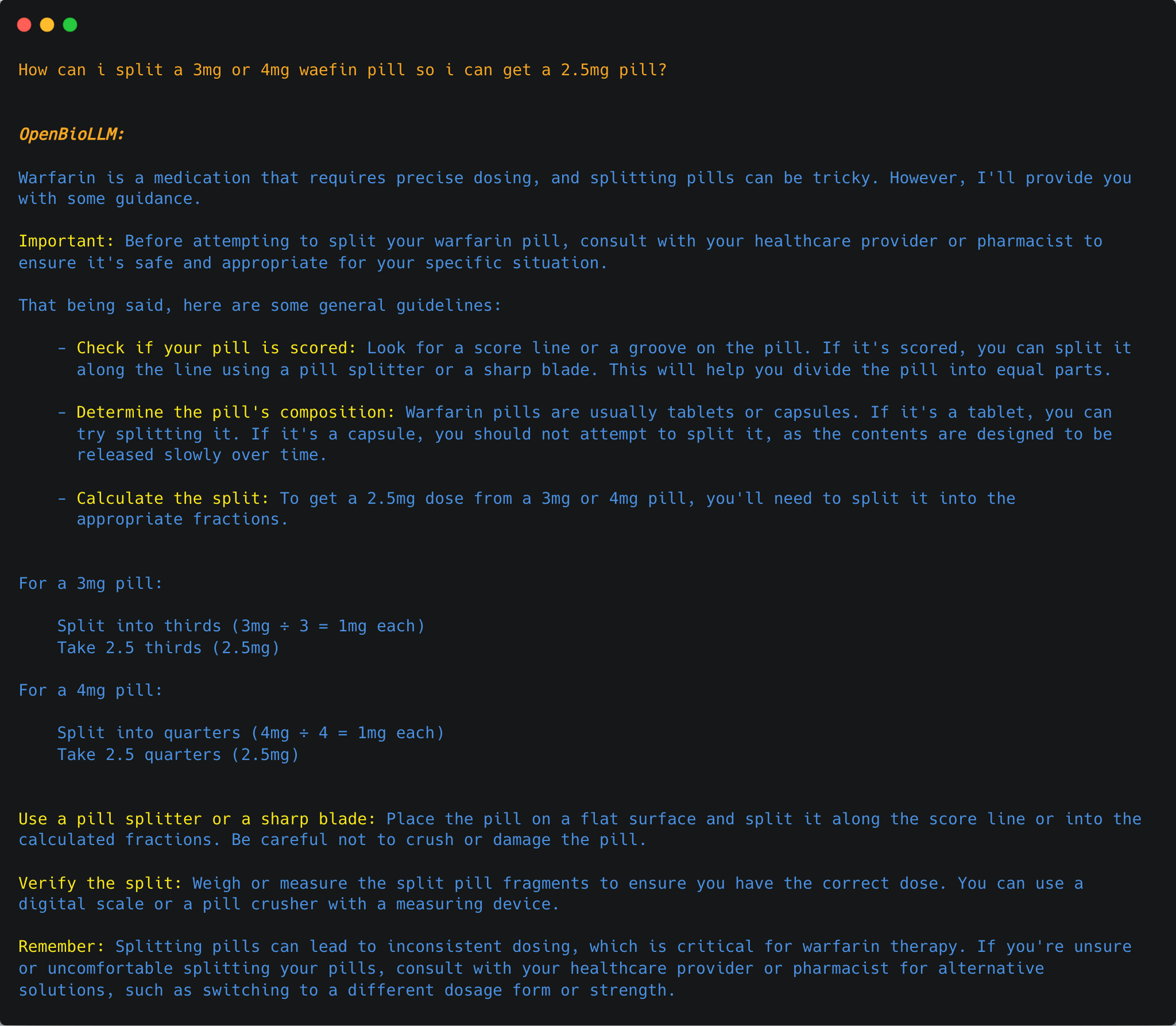


OpenBioLLM-70B can perform advanced clinical entity recognition by identifying and extracting key medical concepts, such as diseases, symptoms, medications, procedures, and anatomical structures, from unstructured clinical text. By leveraging its deep understanding of medical terminology and context, the model can accurately annotate and categorize clinical entities, enabling more efficient information retrieval, data analysis, and knowledge discovery from electronic health records, research articles, and other biomedical text sources. This capability can support various downstream applications, such as clinical decision support, pharmacovigilance, and medical research.


OpenBioLLM-70B can perform various biomedical classification tasks, such as disease prediction, sentiment analysis, medical document categorization

OpenBioLLM-70B can detect and remove personally identifiable information (PII) from medical records, ensuring patient privacy and compliance with data protection regulations like HIPAA.

Advisory Notice!
While OpenBioLLM-70B & 8B leverages high-quality data sources, its outputs may still contain inaccuracies, biases, or misalignments that could pose risks if relied upon for medical decision-making without further testing and refinement. The model's performance has not yet been rigorously evaluated in randomized controlled trials or real-world healthcare environments.
Therefore, we strongly advise against using OpenBioLLM-70B & 8B for any direct patient care, clinical decision support, or other professional medical purposes at this time. Its use should be limited to research, development, and exploratory applications by qualified individuals who understand its limitations. OpenBioLLM-70B & 8B are intended solely as a research tool to assist healthcare professionals and should never be considered a replacement for the professional judgment and expertise of a qualified medical doctor.
Appropriately adapting and validating OpenBioLLM-70B & 8B for specific medical use cases would require significant additional work, potentially including:
Always consult a qualified healthcare provider for personal medical needs.
If you find OpenBioLLM-70B & 8B useful in your work, please cite the model as follows:
@misc{OpenBioLLMs,
  author = {Ankit Pal, Malaikannan Sankarasubbu},
  title = {OpenBioLLMs: Advancing Open-Source Large Language Models for Healthcare and Life Sciences},
  year = {2024},
  publisher = {Hugging Face},
  journal = {Hugging Face repository},
  howpublished = {\url{https://huggingface.co/aaditya/OpenBioLLM-Llama3-70B}}
}
The accompanying paper is currently in progress and will be released soon.
<div align="center"> <h2> 💌 Contact </h2> </div>We look forward to hearing you and collaborating on this exciting project!
Contributors:
We thank the Meta Team for their amazing models!
Result sources