
Downloads · 30 days
51
61% of all-time downloads
Infomaniak-AI/Apertus-1.5-70B-Instruct
Apertus-1.5-70B-Instruct is a image-text-to-text model from Infomaniak-AI. Use it for the image-text-to-text task on the model card, and read the license before you ship it in a product. It is set up for transformers. The card lists the license as apache-2.0.
1. Table of Contents 2. Model Summary 3. Key Features 4. How to Use 5. Evaluation 6. Training 7. Limitations 8. Legal Aspects 9. Contact
Downloads · 30 days
51
61% of all-time downloads
All-time downloads
83
Public
Repo size
145 GB
Likes
2
Trending 1
Click a slice to open those files.
.safetensors145 GB · 100%
From the Hugging Face model README
Apertus 1.5 is a family of 8B and 70B parameter language models designed to advance the state of multilingual, multimodal, fully open, and transparent AI. The models support a wide range of languages, handle contexts of up to 262,144 tokens, and it uses only fully open training data whilst delivering performance comparable to other models of similar size.
The released models are the result of continued pretraining of Apertus 1.0, adding a multimodal mix of 4T tokens to the 8B model and 2T tokens to the 70B model. Apertus 1.5 thus uses the same architecture as the original release, a decoder-only transformer with the xIELU activation function trained with the AdEMAMix optimizer. Our improved post-training recipe enhances the models' instruction-following and tool-use capabilities and, for the first time, allows developers to enable a thinking mode to improve the models' performance on reasoning tasks.
As a first in the Apertus family, the Apertus 1.5 models support multimodal inputs. The model takes images, audio, and text as input and generates text. This enables many new exciting use cases for our developers.
The technical report with further details along with benchmark results, training pipelines, and intermediate checkpoints will be published in the coming weeks.
Users of Apertus can find instructions on getting started with desktop software and cloud providers on our website. Please visit the documentation page if you are interested in trying the model.
Deployment of the models is supported in the following open source frameworks: Transformers, vLLM.
We are currently working on adding support for our models to upstream vLLM and transformers releases. In the meantime, you can use our modified version of vLLM and transformers to run the models. We have pre-installed the dependencies in a Docker image which is available in the GitHub Container Registry. The source dockerfile used to build the image is available in this repository. You can pull the image with the following command:
amd64 architecture:
docker pull ghcr.io/swiss-ai/vllm_apertus_1.5_release:latest-amd64
arm64 architecture:
docker pull ghcr.io/swiss-ai/vllm_apertus_1.5_release:latest-arm64
You can use the following commands to run the models with vLLM:
8B model:
vllm serve swiss-ai/Apertus-v1.5-8B \
  --chat-template-content-format string \
  --gpu-memory-utilization 0.6 \
  --max-model-len 262144 \
  --enable-auto-tool-choice \
  --tool-call-parser apertus
70B model:
vllm serve swiss-ai/Apertus-v1.5-70B \
  --chat-template-content-format string \
  --tensor-parallel-size 4 \
  --gpu-memory-utilization 0.8 \
  --max-model-len 262144 \
  --enable-auto-tool-choice \
  --tool-call-parser apertus
Depending on your hardware, you may need to adjust --tensor-parallel-size, --gpu-memory-utilization, and --max-model-len (e.g. lower --max-model-len if you run out of memory). On some hardware configurations, CUDA Graph capture may fail with --tensor-parallel-size > 1 due to the fused all-reduce RMS optimization. If this occurs, launch vLLM with --compilation-config.pass_config.fuse_allreduce_rms false.
To enable thinking mode, set --reasoning-parser and --default-chat-template-kwargs.enable_thinking as shown below. The tool-call flags are intentionally omitted: tool calling is unsupported in thinking mode, so we don't recommend combining the two.
8B model:
vllm serve swiss-ai/Apertus-v1.5-8B \
  --served-model-name swiss-ai/Apertus-v1.5-8B-thinking \
  --chat-template-content-format string \
  --gpu-memory-utilization 0.6 \
  --max-model-len 262144 \
  --reasoning-parser apertus \
  --default-chat-template-kwargs.enable_thinking true
70B model:
vllm serve swiss-ai/Apertus-v1.5-70B \
  --served-model-name swiss-ai/Apertus-v1.5-70B-thinking \
  --chat-template-content-format string \
  --tensor-parallel-size 4 \
  --gpu-memory-utilization 0.8 \
  --max-model-len 262144 \
  --reasoning-parser apertus \
  --default-chat-template-kwargs.enable_thinking true
Apertus 1.5 accepts interleaved text, image, and audio inputs and generates text. The model does not generate audio or images.
The integration is not yet part of a released Transformers version (upstreaming is in progress). Until then, install transformers from our branch:
pip install "transformers[torch,vision,audio] @ git+https://github.com/swiss-ai/transformers.git@3797303dda74844e3d1f8977ff5518bb91f818b4"
Load the processor and model once. The same code works for both released sizes:
import torch
from transformers import AutoModelForMultimodalLM, AutoProcessor

MODEL_ID = "swiss-ai/Apertus-v1.5-8B"  # or "swiss-ai/Apertus-v1.5-70B"

processor = AutoProcessor.from_pretrained(MODEL_ID)
model = AutoModelForMultimodalLM.from_pretrained(
    MODEL_ID, dtype="auto", device_map="auto"
).eval()


def generate(messages, max_new_tokens=256, **template_kwargs):
    inputs = processor.apply_chat_template(
        messages,
        add_generation_prompt=True,
        tokenize=True,
        return_dict=True,
        return_tensors="pt",
        **template_kwargs,
    ).to(model.device)
    with torch.inference_mode():
        output_ids = model.generate(**inputs, max_new_tokens=max_new_tokens)
    return processor.decode(
        output_ids[0, inputs["input_ids"].shape[-1]:], skip_special_tokens=True
    )
messages = [
    {"role": "system", "content": "You are a concise and helpful assistant."},
    {"role": "user", "content": "Explain why the sky appears blue in one sentence."},
]

print(generate(messages))
Images can be supplied as URLs, local paths, PIL images, or arrays:
messages = [
    {
        "role": "user",
        "content": [
            {
                "type": "image",
                "url": "https://huggingface.co/datasets/huggingface/documentation-images/resolve/main/coco_sample.png",
            },
            {"type": "text", "text": "Describe this image in detail."},
        ],
    }
]

print(generate(messages))
Audio files referenced by URL or local path are decoded and resampled to 24 kHz automatically; in-memory waveforms are accepted as mono NumPy arrays already sampled at 24 kHz:
messages = [
    {
        "role": "user",
        "content": [
            {"type": "text", "text": "Summarize what is said in this audio clip."},
            {
                "type": "audio",
                "url": "https://huggingface.co/datasets/hf-internal-testing/dummy-audio-samples/resolve/main/bcn_weather.mp3",
            },
        ],
    }
]

print(generate(messages))
A batch may mix prompts with different numbers and kinds of media. The shipped tokenizer defaults to the left padding that batched generation requires:
conversations = [
    [
        {
            "role": "user",
            "content": [
                {
                    "type": "image",
                    "url": "https://huggingface.co/datasets/huggingface/documentation-images/resolve/main/bee.jpg",
                },
                {"type": "text", "text": "Describe this image in one sentence."},
            ],
        }
    ],
    [{"role": "user", "content": "Name the four official languages of Switzerland."}],
]

inputs = processor.apply_chat_template(
    conversations,
    add_generation_prompt=True,
    tokenize=True,
    return_dict=True,
    return_tensors="pt",
    processor_kwargs={"padding": True},
).to(model.device)

with torch.inference_mode():
    output_ids = model.generate(**inputs, max_new_tokens=256)

print(processor.batch_decode(output_ids[:, inputs["input_ids"].shape[-1]:], skip_special_tokens=True))
Thinking is turned off by default. Pass enable_thinking=True to apply_chat_template to activate it; the model then reasons between the <|inner_prefix|> and <|inner_suffix|> tokens before its visible answer.
messages = [
    {"role": "user", "content": "A bat and a ball cost 1.10 CHF together. The bat costs 1 CHF more than the ball. What does the ball cost?"},
]

print(generate(messages, enable_thinking=True, max_new_tokens=2048))
Budget generously for max_new_tokens in thinking mode: the reasoning can be several times longer than the visible answer, and a truncated generation may end before the answer begins. The reasoning markers are deliberately not stripped by skip_special_tokens=True, so the deliberation span can be parsed out of the decoded text.
output_vocab_size); logits are padded to the full 266,752-token vocabulary with non-selectable scores, so standard generation utilities work unchanged while image and audio tokens are never generated.float32 automatically on half-precision loads. Avoid re-casting the loaded model with .half()/.to(dtype).Detailed benchmark evaluations for the pretraining and post-training phases, multilingual evaluations, and long-context evaluations from the original Apertus release will be provided in the technical report.
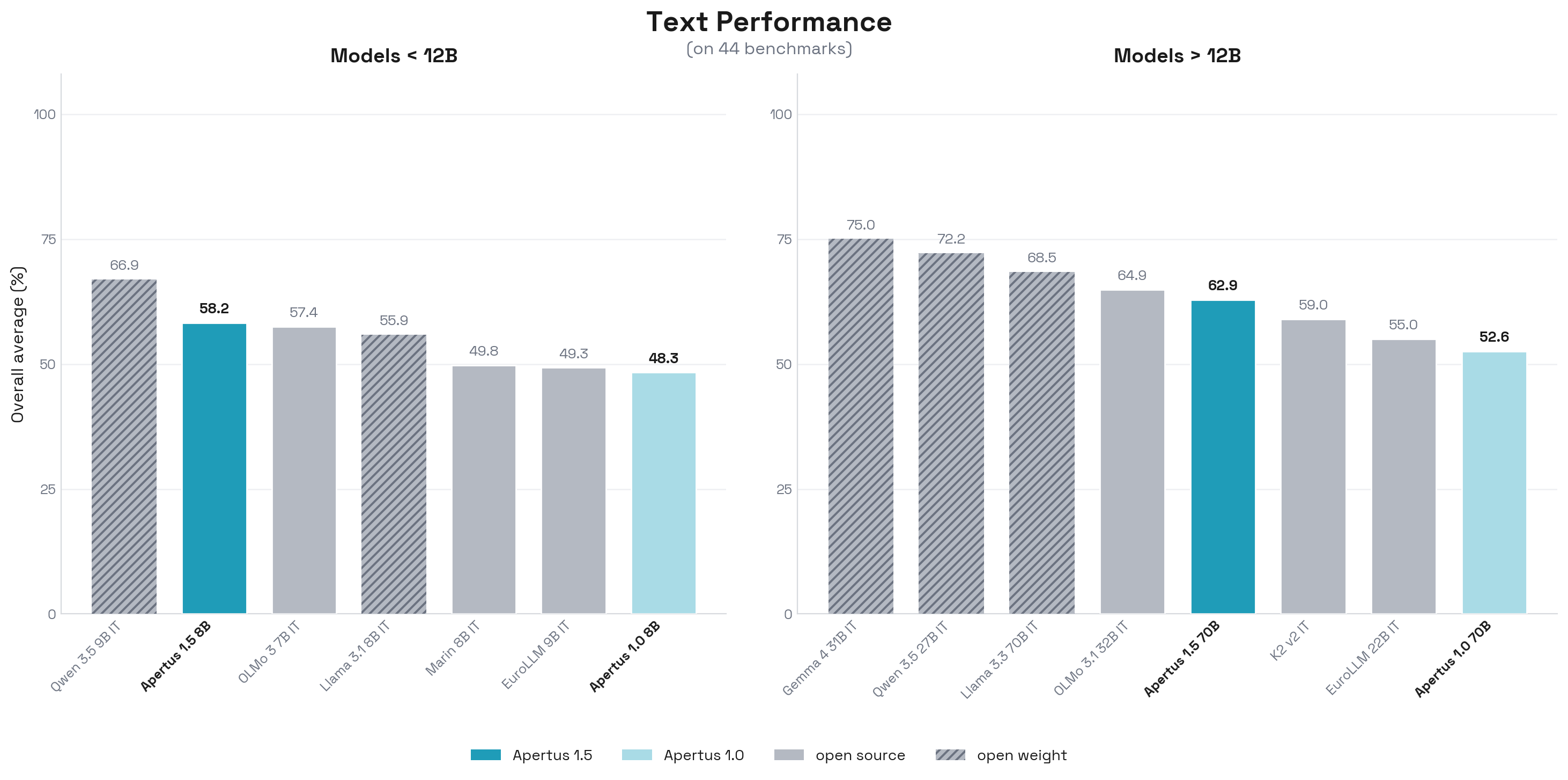
Text benchmarks cover various domains like knowledge (MMLU, MMLU-Pro, AGIEval, ARC-Challenge, TruthfulQA, CommonsenseQA, SQuAD v2, HellaSwag), instruction following (IFEval, Multi-IF, IFBench), chat (AlpacaEval), math (GSM8K, MATH, Minerva-MATH, MathQA, GSM8K-Platinum, MATH-500), coding (HumanEval, MBPP), reasoning (BIG-Bench Hard, GPQA, ACPBench, DROP), multilingual ability (Global-MMLU, MGSM, multilingual TruthfulQA, INCLUDE, mLogiQA, XNLI, multilingual ARC), cultural knowledge (BLEnD, CulturalBench, SwitzerlandQA), safety and bias (BBQ, ToxiGen, WMDP, MultiJail, PolygloToxicityPrompts), system-prompt robustness (RealGuardrails), and tool use (BFCL v3).
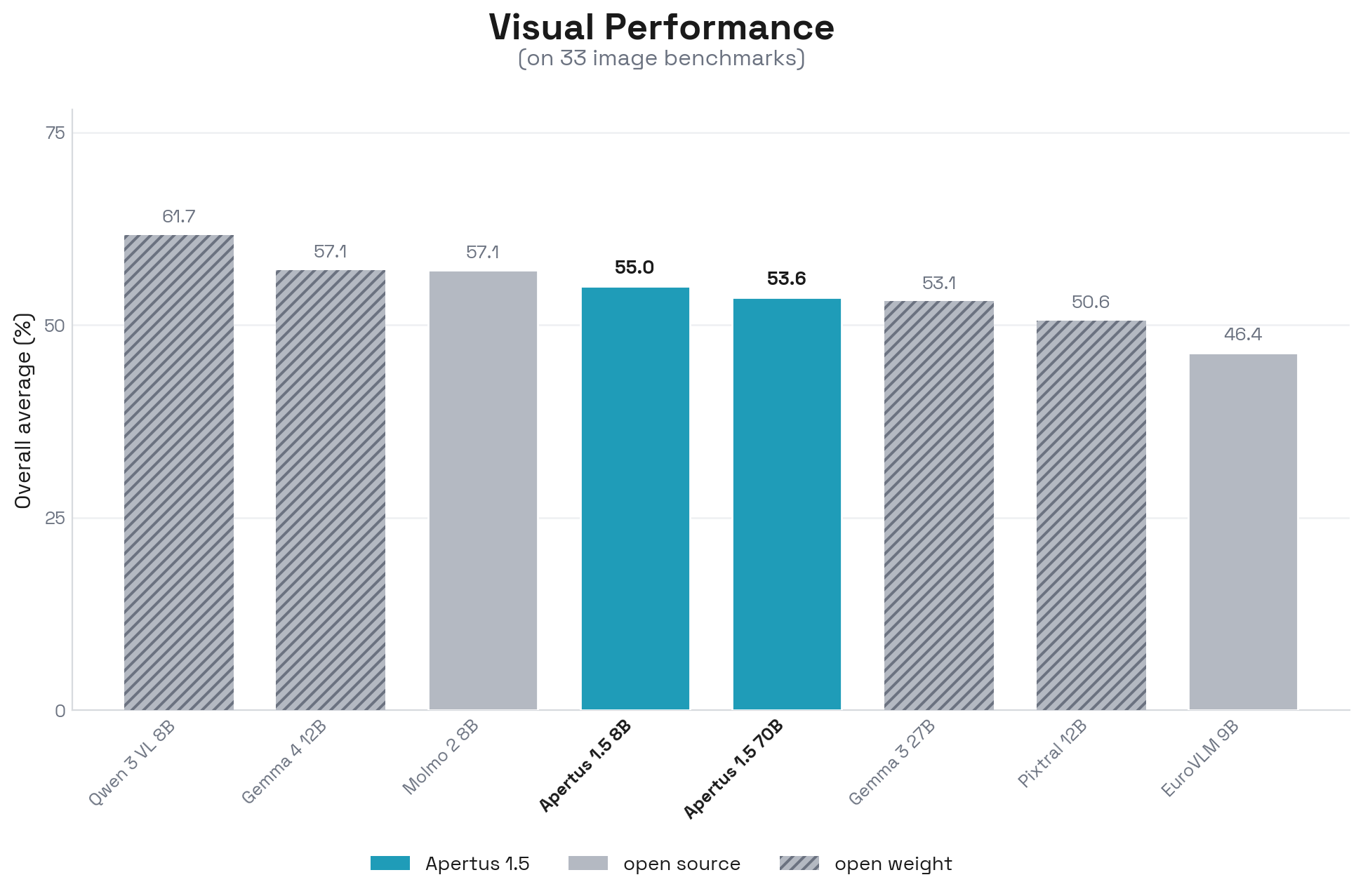
Image benchmarks cover general VQA and perception (GQA, MMStar, RealWorldQA, VQAv2, V*Bench, CountBench), robustness and bias (MMVP, VLMs-Are-Biased, VLMsAreBlind), documents and OCR (ChartQA, DocVQA, SEED-Bench-2-Plus, InfoVQA, OmniDocBench), visual math and logic (BabyVision, MathVision, MathVista), STEM knowledge (AI2D, MMMU, MMMU-Pro, ScienceQA), spatial intelligence (MMSI, ViewSpatial, MindCube, EmbSpatial), remote sensing (FRIEDA, GeoBench, VRSBench-VQA), hallucination alignment (POPE), and medical imaging (PathVQA, PMC-VQA, SLAKE, VQA-RAD).
Apertus can produce text on a variety of topics, but the generated content may not always be factually accurate, logically consistent, or free from biases present in the training data. These models should be used as assistive tools rather than definitive sources of information. Users should always verify important information and critically evaluate any generated content.
See the Apertus Charter for the alignment principles that govern the responses of the models.
Documentation and code of practice for the EU AI Act are available at the following links:
For removal requests of personally identifiable information (PII) or of copyrighted content, please contact the respective dataset owners or us directly:
Currently no output filter is provided. We endeavour to address data protection deletion requests by updating filters in our data pipeline, and providing regular (at least bi-annual) releases to the model weights. We strongly advise downloading and updating new model weights from this site every six months.
To contact us, please use the links at https://apertus-ai.org/contact/ or send an email to [email protected].