
Downloads · 30 days
4
7% of all-time downloads
Dreamy0/GermiNet_v2
GermiNet_v2 is a machine learning model from Dreamy0. Use it for the machine learning task on the model card, and read the license before you ship it in a product. The card lists the license as mit.
--- license: mit tags: - vision - image-segmentation - instance-segmentation datasets: - custom-germination-dataset widget: - src: https://example.com/path/to/germination-image1.jpg exampletitle: Germination Image 1 -…
Downloads · 30 days
4
7% of all-time downloads
All-time downloads
58
Public
Repo size
167 MB
Likes
0
Public
Click a slice to open those files.
.bin167 MB · 100%
From the Hugging Face model README
license: mit tags:
GermiNet model trained on a custom germination dataset for instance segmentation (small-sized version, Swin backbone). It is based on the MaskFormer architecture introduced in the paper MaskFormer: Per-Pixel Classification is Not All You Need for Semantic Segmentation and first released in this repository.
Disclaimer: This model card is written by [Your Name/Organization] with assistance from Grok (xAI) for the Hugging Face community.
GermiNet is a MaskFormer-based instance segmentation model fine-tuned to detect and segment "normal" and "abnormal" seeds in germination images. It uses the facebook/maskformer-swin-tiny-coco pre-trained checkpoint as its backbone, with a Swin-Tiny transformer architecture. The model predicts a set of masks and corresponding labels for three classes: "background," "normal," and "abnormal," with an additional "no object" class handled internally by MaskFormer. The model was trained on a small custom dataset as a proof-of-concept for automating germination counting in agricultural research.
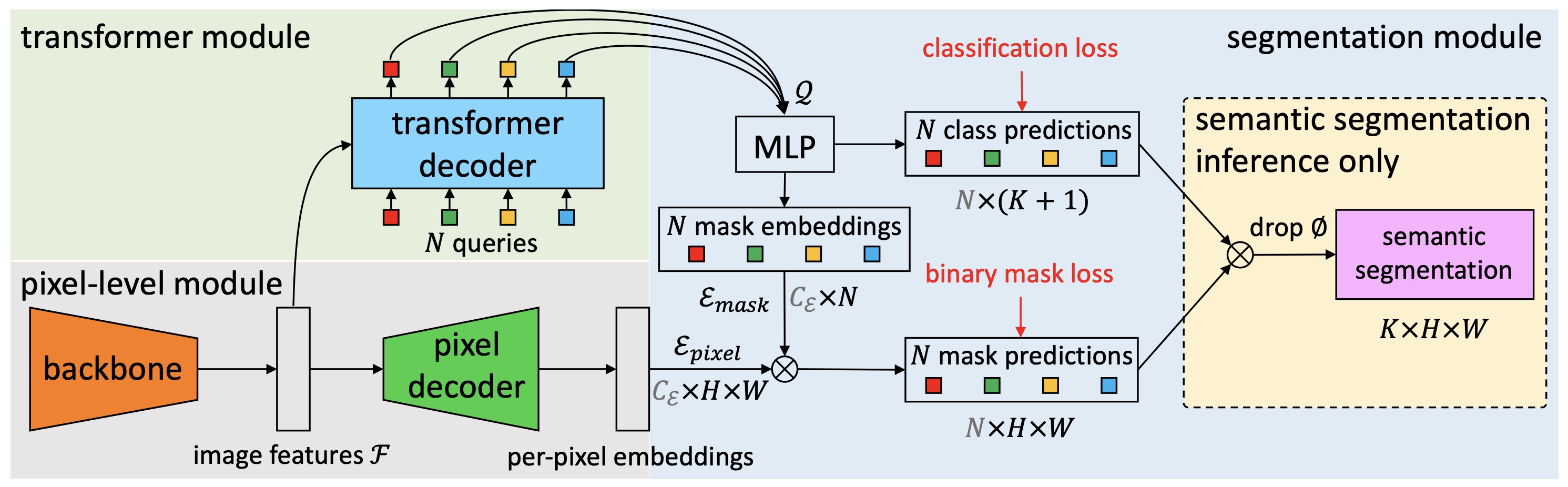
GermiNet is intended for instance segmentation tasks in agricultural research, specifically for detecting and segmenting "normal" and "abnormal" seeds in germination images. It can be used with tools like CVAT for automated annotation workflows.
See the model hub to look for other fine-tuned versions if needed.
Here’s how to use this model for instance segmentation:
import requests
import torch
from PIL import Image
from transformers import AutoImageProcessor, MaskFormerForInstanceSegmentation

# Load GermiNet fine-tuned on custom germination dataset
processor = AutoImageProcessor.from_pretrained("your-username/germi-net")
model = MaskFormerForInstanceSegmentation.from_pretrained("your-username/germi-net")

# Load an image (replace with your image URL or local path)
url = "https://example.com/path/to/germination-image.jpg"
image = Image.open(requests.get(url, stream=True).raw)
# Alternatively, use a local image
# image = Image.open("path/to/your/image.jpg")
inputs = processor(images=image, return_tensors="pt")

# Run inference
with torch.no_grad():
    outputs = model(**inputs)

# Model predicts class_queries_logits and masks_queries_logits
class_queries_logits = outputs.class_queries_logits  # Shape: (batch_size, num_queries, num_classes + 1)
masks_queries_logits = outputs.masks_queries_logits  # Shape: (batch_size, num_queries, height, width)

# Post-process predictions
predicted_classes = class_queries_logits.argmax(-1).cpu().numpy()
mask_predictions = masks_queries_logits.sigmoid().cpu().numpy()
binary_masks = (mask_predictions > 0.5).astype(np.uint8)

# Map predictions to labels
id2label = {0: "background", 1: "normal", 2: "abnormal", 3: "no object"}
predicted_labels = [id2label[cls] for cls in predicted_classes[0]]
print("Predicted labels:", predicted_labels)

# Optional: Visualize (requires matplotlib and cv2)
import numpy as np
import matplotlib.pyplot as plt
import cv2

visualization_size = (800, 800)
resized_masks = np.zeros((binary_masks.shape[1], *visualization_size), dtype=np.uint8)
for i in range(binary_masks.shape[1]):
    resized_masks[i] = cv2.resize(binary_masks[0, i], visualization_size, interpolation=cv2.INTER_NEAREST)

image_np = np.array(image)
aspect_ratio = image_np.shape[1] / image_np.shape[0]
new_height = visualization_size[0]
new_width = int(new_height * aspect_ratio)
resized_image = cv2.resize(image_np, (new_width, new_height), interpolation=cv2.INTER_LINEAR)
if new_width != visualization_size[1]:
    start_x = (new_width - visualization_size[1]) // 2
    resized_image = resized_image[:, start_x:start_x + visualization_size[1]]